
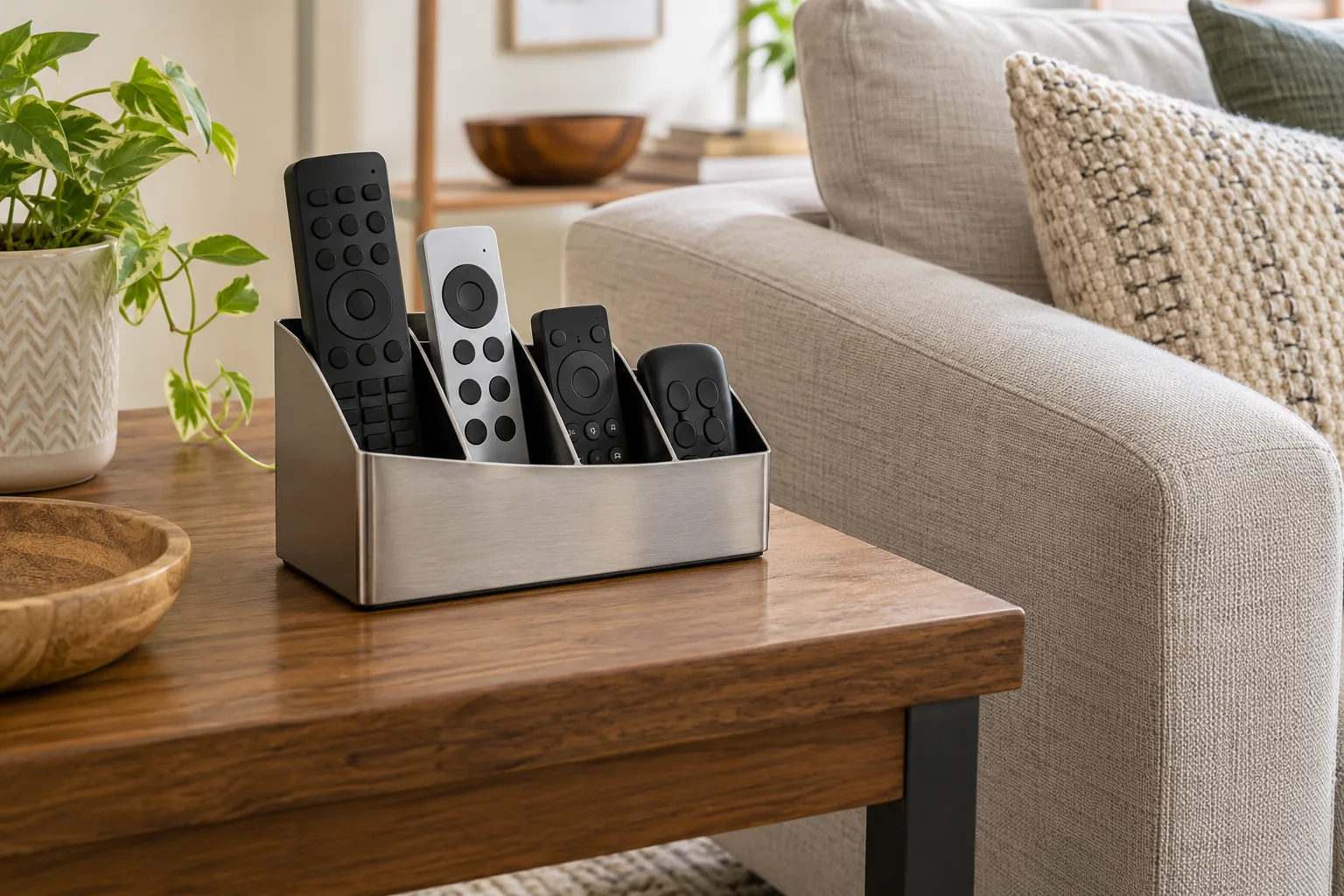
A metal remote-control organizer should be sized around the actual devices and cases a buyer expects customers to store. Measure length, width and thickness, map each remote to a compartment, and test how users insert and retrieve them. An organizer’s slot count does not establish universal compatibility. Buyers should also keep storage fit separate from any claim about infrared, radio, charging or signal performance; a metal compartment’s appearance alone does not prove those outcomes.
Which Devices Belong in the Assortment Matrix?
Remote controls vary in shape, button layout, protrusions, battery covers and protective cases. A buyer should list the devices expected to fit, including common television, streaming, audio or room-control remotes if they are part of the target audience. For an organizer sold with a furniture or hospitality package, use actual reference models from the intended system. Do not assume devices from the same brand share the same dimensions.
Record overall length, widest point, thickness, case or sleeve size and any projecting buttons or edges. If the device is tapered or has a curved rear surface, note the orientation in which it is stored. A remote that fits bare may not fit with a protective silicone cover. If model identification cannot be disclosed, use a dimensioned representative sample and define its envelope.
| Matrix field | What to capture | سؤال من المشتري |
|---|---|---|
| Device model | Brand/model or anonymous sample ID | Which exact remote was checked? |
| Length and width | Maximum external envelope | Does it fit the compartment opening? |
| Thickness | Include case and protrusions | Can it stand or lie in the intended position? |
| Button/display location | Front surface and projections | Is it accessible when stored? |
| Case condition | Bare, sleeve or protective cover | Does the sold use include the case? |
| Compartment | Clear width, depth and divider height | What is the true usable space? |
| Retrieval | Lift, pull or tilt | Can one device be removed independently? |
| Contact points | Edge, base or divider | Could the surface rub or snag? |
| Labeling | Slot identity or category | Can users return it to the right place? |
Include both the largest and smallest devices. A compartment designed around one long remote may leave a short one buried or tilted. If the buyer wants one universal organizer, define the range and test representative devices across that range.
How Should Compartments Be Designed and Compared?
A single large pocket allows mixed shapes but can make devices overlap. Individual dividers organize remotes but reduce clearance and may exclude unusually wide or thick devices. A tiered organizer can make buttons visible but may use more desk space. Compare options against the intended location and device assortment.
Test each device in its assigned compartment. Confirm that it can be inserted without forcing it and removed without catching buttons, battery covers or case edges. If the user must identify a device by its visible face, ensure the stored orientation leaves the intended controls accessible. Do not design a deep slot that hides the interface without reviewing how customers will select the right remote.

Check adjacent compartments. A wide remote may prevent use of the neighboring slot, even if it fits alone. Try the complete arrangement with all representative devices loaded. A full organizer may behave differently from one item at a time, especially when dividers are closely spaced. Record the tested layout and avoid marketing images that show an arrangement not validated by the sample.
What Should Buyers Check at Contact Points?
Identify where the organizer touches a device: base, side rails, divider, edge or surrounding frame. Inspect the metal finish, wire ends and joints for visible roughness. If a removable liner or pad is included, identify its material and exact position. These checks can flag product-development questions but do not establish that devices will never scratch or that a coating is compatible with every case material.
A metal surface can also affect a device’s wireless or infrared performance in ways that depend on the device and its orientation. This article makes no signal-blocking or signal-enhancement claim. If a buyer’s product concept depends on transmitting a signal while the remote remains stored, test the actual remote, organizer geometry and operating direction as a separate requirement. A slot that merely fits the device does not prove that commands will work through or around the structure.
Do not claim that an organizer charges a device unless it includes a defined charging arrangement and evidence. If cables are involved, record their route, connector clearance and included components. Most storage holders do not automatically provide charging or electronic protection.
How Should Capacity and User Access Be Evaluated?
State the number of devices tested and the corresponding models or dimension range. Capacity should reflect practical use, not just the number of openings. If each pocket is dedicated to a device category, identify that intention. A user should be able to retrieve one device without removing the others or tipping the organizer.
Try the normal selection sequence: pick up a device, return it, then retrieve another from an adjacent compartment. Observe whether the holder shifts, whether smaller remotes fall below the rim and whether labels remain visible. If the organizer is placed beside a sofa, bed or desk, test it in the available footprint and verify reach and viewing conditions. For hospitality, identify who maintains the room and how remote identities are communicated.
Any load or stability criterion belongs to the product’s defined use and should be set by the responsible quality owner. Do not infer an allowable load from material thickness or a static tabletop photo. This article provides no universal stability rating.
What Finish, Labeling and Packaging Decisions Matter?
Choose a finish based on the intended furniture, décor or retail assortment. Compare an approved physical sample under the expected lighting. A finish name alone does not guarantee color or gloss consistency, especially across different shapes and suppliers.
Labeling can reduce confusion when several devices look similar. The buyer might use slot names, pictograms or a paper guide, but the final solution should be reviewed with target users. Avoid printing brand names or device icons without permission and ensure artwork corresponds to the intended device list. If the organizer is supplied without remotes, product images should make that clear.
Packaging should protect protruding dividers and prevent finish-to-finish rubbing. Check whether the organizer ships assembled or flat-packed. If assembly is required, verify parts and instructions on an actual sample. Include the exact liner, labels, screws or other accessories that the customer is promised.

Importer Fit Approval Checklist
- List remote models or define an objective dimension range.
- Include protective cases and protrusions in measurements.
- Measure internal compartment openings and usable depth.
- Assign intended devices to specific compartments.
- Test the complete loaded layout and normal retrieval sequence.
- Check button visibility and independent access.
- Inspect edges, dividers, joints and contact surfaces.
- Treat signal, charging and electronic protection as separate claims.
- Record capacity against the tested device list.
- Confirm labeling, included accessories and packaging.
- Tie sample approval to the drawing revision and device matrix.
- Recheck after a remote model, case or organizer design changes.
How Should Buyers Manage Changing Device Assortments?
Remote-control assortments can change when televisions, streaming devices, audio products or room-control systems are updated. Buyers should decide whether the organizer is designed around a stable product bundle or intended to accept a range of changing remotes. A bundled kit can use a precise slot assignment, while a general-purpose organizer needs wider documented boundaries and a sample set that represents them. The sales description should make that distinction clear.
When a new device is introduced, add its model and dimensions to the matrix before promising a fit. Check whether protective covers are sold separately and whether their dimensions differ by color or revision. A small change in a silicone cover can affect compartment clearance even if the remote itself has not changed. Where devices are anonymous, retain a measured envelope and a sample label so a future buyer can recreate the check without publishing proprietary brand details.
Instructions can help users return each remote to an intended compartment. Evaluate icons, labels or divider colors with the target audience, and avoid placing permanent labels where they could obscure buttons or interfere with cleaning. A removable card may be easier to revise when the device range changes. If a label is printed on a product, include the artwork revision in the approved product record.
Packaging and replenishment should preserve assortment clarity. If the organizer is sold without remotes, show that in product images or package copy. If it is sold with devices or cables, list those items explicitly and verify that the packaging protects them separately. A new kit composition may require new fit testing and new product data, even where the metal organizer remains visually unchanged.
Review the Organizer in Its Actual Room Location
Remote controls are often used from a sofa, bedside table, desk or hospitality room. Each setting changes how a user reaches the organizer and sees its contents. Place the sample in a representative location and check whether the opening faces the user, whether adjacent furniture blocks retrieval and whether a divider obscures the device identity. The buyer should test the complete arrangement rather than judging a product photo shot from above.
If the organizer is used in a shared room, consider how users distinguish similar remotes. A slot map or simple label may help, but the naming should match the actual device bundle and remain easy to update. For hotel or serviced-apartment programs, the buyer may want a maintenance record for the remote model and its location. That record is operational information, not a promise about electronic compatibility.
Do not treat the metal organizer as a protective case. It may hold devices in a defined place, but it does not establish impact resistance, liquid protection, charging or signal transmission. If a product concept includes a cover, cable channel or electronic feature, define that as a separate design requirement and test the exact configuration. The current scope is organization and compartment fit.
When cleaning or moving the organizer, users may need to remove devices first. If a pad, liner or label is detachable, show how it is returned to its intended position. For a kit with multiple dividers, give each part an identity so a replacement does not create a different opening. Keep those details in the instruction and pack list.
For programs with several device bundles, create a separate fit map for each bundle and mark the organizer revision used. This is especially useful where television and streaming equipment are sold in different packages. The buyer can show which pocket is assigned to each device without publishing a broad claim that every remote fits. If the bundle changes, the team knows which rows in the matrix need review.
Product artwork should also distinguish the organizer from the devices shown inside it. If remotes are props, note that they are not included. If the product is sold with accessories, confirm those items in the bill of materials and package checklist. Consistent scope across image, description and carton reduces avoidable post-purchase questions.
For molded or fabricated dividers, confirm that the as-packed configuration matches the sample. A missing divider can change both device fit and the way remotes are displayed. The receiving checklist can count the components and confirm their location before the product is placed into a retail or hospitality setting. If replacement parts are not sold separately, make that limitation visible to the internal product team rather than implying serviceability.
Record the approved metal remote-control organizer scope with the sample identity and current drawing revision so later product changes trigger the right review.
الأسئلة الشائعة
Does a compartment count tell buyers how many remotes fit?
Not always. Some openings may be too narrow for target devices, and a crowded layout can obstruct retrieval. Validate the complete arrangement.
Will an organizer fit remotes with protective covers?
Only if the covered dimensions fit and have been tested. Include the case in the model list.
Can metal block a remote-control signal?
This depends on device technology, geometry and orientation. The article makes no universal claim; buyers should test the actual device and intended use if signal operation matters.
Does a metal holder charge a remote?
Not unless a charging design and compatible components are provided. Storage alone does not imply charging.
Does a smooth finish prove a remote cannot be scratched?
No. Inspect contact areas and substantiate any scratch-protection language separately.
Koitor Scope and Buyer Next Step
Koitor’s confirmed scope includes custom metal hardware development discussions, sample work, forming, finishing, assembly and packaging. Current production of a remote-control organizer, universal device compatibility, signal performance, charging or scratch protection is not confirmed. Buyers may review the home storage OEM context و metal storage rack page, then share device samples, a dimension matrix, finish reference and target quantity through the contact page. Fit and any electronic or contact claim need validation for the exact configuration.
When comparing supplier proposals for metal remote-control organizer, use the same reference samples and acceptance notes to keep the purchasing decision traceable.
Developing a Remote-Control Organizer?
Share the target device list, protective-case sizes, compartment sketch, intended location and product quantity for a sample-fit discussion.
OEM / العلامة التجارية الخاصة
حوّل دليل التوريد هذا إلى موجز منتج
يرجى إطلاعنا على المنتج المستهدف، والحجم، والتشطيب، وكمية الطلب، ومتطلبات التغليف. وسيتلقى فريقك تقييمًا عمليًّا لإمكانية التصنيع قبل تقديم عرض الأسعار.


 English
 Español
 Português
 Français
 Deutsch
 العربية