
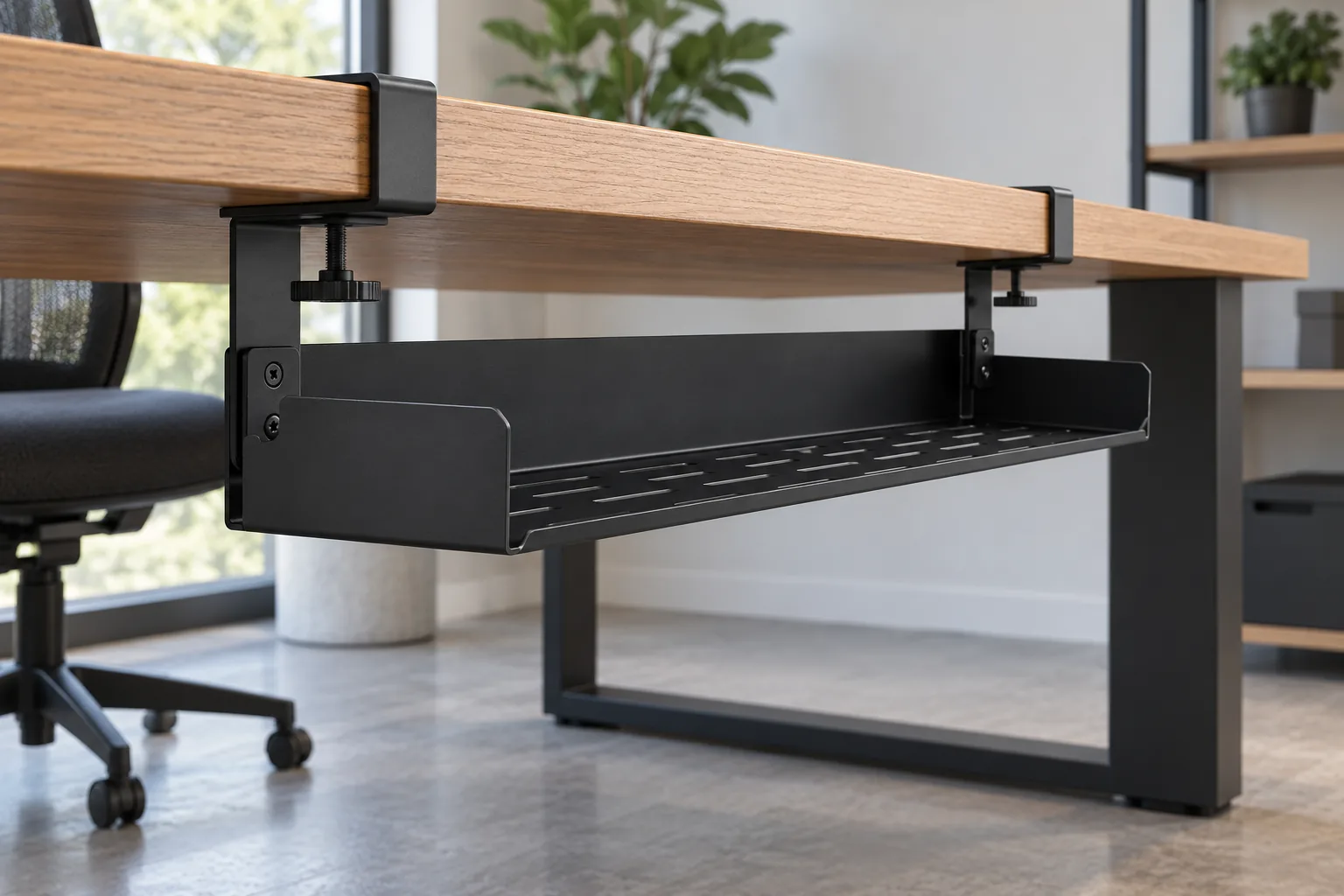
Ein under desk cable management tray specification should define how the proposed tray meets the actual desk edge, underside structure, mounting route and cable envelope. For an importer, the practical deliverable is not just a tray length: it is a controlled drawing, a list of representative desk interfaces, included hardware and a sample record showing exactly which configurations were checked. The broad search is retail-led; this guide addresses B2B RFQ and sample approval. Koitor’s production capability for cable trays is not verified; this article explains buyer information and does not present the tray as a current Koitor product.
Define fit and mounting requirements
A clamp-mounted tray can have a suitable nominal length and still fail to attach. Start the under desk cable management tray specification at the actual mounting edge. The relevant edge may include a thick apron, a reinforcing lip, a rounded front, a cable channel or a frame member underneath. Measure the mounting zone and send a side view or section, not only a catalogue dimension.
The same issue appears with other mounting routes. A screw-mounted tray depends on the underside material, accessible screw locations, insert or pilot-hole plan, and the distance to moving components. A bracket may require a clear slot or fastener path. Resolve them before comparing appearance or price.
Record the desk construction or range. For multiple models, list each one or define a measured envelope. Separate measured dimensions from assumptions. Do not turn one sample installation into a universal compatibility statement for every desk sold under the same brand.
Build a dimension sheet that a supplier can quote against
A first RFQ should identify the exact boundaries that control fit. Start with the desktop thickness where the clamp sits, then record any local buildup at the leading edge and the underside clearance immediately behind it. Show the distance from the edge to apron, crossbar, leg, motor housing or other obstruction. If a desk is height-adjustable, identify which members move and their travel envelope; ask the responsible product engineer to review any motion requirement rather than assuming the tray clears it.
Separate outer from usable length; end plates, clamps and dividers consume space. Width and depth should distinguish the cable-retaining area from outer dimensions. If a power strip or adapter is part of the intended arrangement, provide its real outer envelope, cord exit direction and plug clearance. They do not establish electrical safety.
Use a controlled drawing with a revision, units and a named datum. Mark whether dimensions apply to the assembled tray, an individual formed part, the mounting hardware or the packaging. Identify critical-to-fit dimensions separately from reference dimensions. For a concept, mark provisional dimensions and ask what else is needed to quote.
| RFQ input | What to show | Why it affects the first sample |
|---|---|---|
| Desk edge | Thickness at clamp position, radius, lip or reinforcement | Determines whether the selected clamp or bracket can seat |
| Underside profile | Apron, beam, leg, motor and obstruction locations | Shows the space available to install and use the tray |
| Mounting route | Clamp, screw, fixed bracket or another defined interface | Controls hardware, holes, installation access and package contents |
| Tray envelope | Outer and usable length, width, depth and openings | Confirms whether the intended power strip and cable bundle fit |
| Contact surfaces | Pad or protection location, if included in the design | Creates a review point for desk contact and finish condition |
| Sample scope | Named desks or boundary samples and the test record | Limits the approval to the configurations actually checked |
Choose and describe the mounting route
Select the mounting principle before comparing quotes. Include it in the under desk cable management tray specification so suppliers price the same interface. They also require different evidence and different sample checks.
A clamp avoids drilling, but must fit local thickness and profile. Show open/closed geometry, pad location, jaw depth and adjustment access. Do not send only the top thickness. A decorative edge lip or thickened underside can block the clamp even when the central top panel is within a listed range.
For screw mounts, control hole locations, tool access, fastener type and supplied hardware. A supplier should not infer that a screw can be driven into every desktop material or that a particular screw is acceptable for an unreviewed substrate. The buyer’s furniture engineer or installation owner should define the attachment assumptions for the intended desk.
A fixed bracket suits a known desk family but may narrow fit. Show mating geometry and tolerances. Name the owner of the interface drawing and revisions when suppliers differ.
The StarTech product page illustrates why model-specific limits belong on a product sheet: that clamp-on model publishes a 5–50 mm mounting-surface range. Its installation manual also describes how its clamps attach to a mounting surface. Treat those figures and steps as that manufacturer’s product information only. They do not set a universal range for another tray, clamp or desk.
Map the underside clearance
Underside clearance is often the missing dimension in an otherwise detailed request. Map the space inward from the desk edge, showing any apron, crossbar, channel, leg, actuator, motor enclosure or power accessory. Record each obstruction’s height, depth, setback and movement. A top view helps, but the side profile must show the clamp relationship.
If the tray is intended for a height-adjustable desk, the buyer should identify the intended desk model and request review of the actual full travel path. The article does not establish a safe moving clearance or test method for a particular desk. A static photo cannot prove motion clearance; the responsible furniture engineer should define the review conditions.
Likewise, distinguish cable access from tray capacity. A hole, open end or slot may be useful for routing but can affect retention or create an edge that contacts insulation. Describe which route is preferred, which cable sizes or connector envelopes matter, and whether the buyer wants the cable bundle to enter from the side or drop from above. Ask the supplier to show the intended path on the drawing. Do not claim that a metal tray protects against electrical hazards unless that is verified for the actual product and applicable requirements.
Specify tray geometry and finish
Describe intended contents as a set. List the power bar, adapters, connectors and cable bundle that must fit; provide samples or measured drawings where possible. Include the largest plug orientation, cord bend direction, access to switches if relevant, and the sequence for placing or removing components. A bounding box helps, but provide connector shape and cord exit too.
Separate external dimensions from usable dimensions. A folded lip, center rib, end plate, adjustable overlap or support bracket may reduce the clear tray area. For sliding designs, define adjustment and overlap ranges. Show how dividers or retainers affect access. More openings can change retention and access; assess the actual layout.
A useful drawing set includes a top view, side view, end view and one assembled view at the intended mounting point. Detail the clamp or screw interface, sharp-edge requirements and visible surfaces. If the tray is supplied in more than one part, show the assembly orientation and fasteners, including whether the customer is expected to complete assembly.

Compare the tray and clamp to a measured desk-edge section; the visual is conceptual and does not establish a Koitor product or tested fit range.
Specify finish and packaging questions
The finish request should name the intended color or surface appearance and identify cosmetic faces. If a clamp contacts a visible desk surface, ask whether the sample includes the specified pad or protective component and inspect its position. Do not assume a pad prevents all scratches or movement. It is one design element whose material, location and assembly need to match the approved sample and buyer’s use conditions.
For a metal tray, clarify which supplier owns the finish specification and whether the buyer expects a named color reference, gloss range or sample panel. If a coating is used, ask how cut edges, holes, fasteners and the adjustment area will be handled. The factory must confirm project capability; no cable-tray coating route is claimed for Koitor.
Packaging should preserve the actual part geometry and keep mounting components identifiable. Protect exposed ends, clamp faces and brackets. Ask the supplier to quote the packed version, not only the bare product. Specify whether fasteners are bagged by tray, whether assembly instructions are needed, how any surface-protection film is removed, and which carton labels identify the model or revision. Request a sample pack or pack-out photo when packing method is part of the retail offer. Do not treat a strong-looking carton or one successful sample shipment as proof that all transit conditions are covered.
Plan a first sample and record fit
A sample should answer a written question. Before ordering it, identify which desk interface it represents, which parts are production-intent, which remain provisional and what evidence will count as acceptance. A concept prototype may show layout, but does not prove production fit, material, finish, hardware or consistency.
Use at least one representative desk or a controlled fixture that reproduces the measured edge and underside profile. Test each named desk family or an engineer-approved boundary envelope. Label photographs with the desk model, measurement point, tray revision and mounting hardware. Attach photos to the approval form and drawing.
The sample review can follow this sequence:
- Confirm the part number, drawing revision and hardware set against the RFQ.
- Measure the mounting edge at the actual clamp or fastener location, not at a convenient but different point.
- Install the tray using the specified route and record any interference or missing access.
- Check the intended cables and equipment envelopes without energizing the equipment as part of this fit exercise.
- Confirm that the required cables can enter, exit and be removed in the planned way.
- Inspect the contact areas, finish and any protective component for the conditions stated in the buyer’s acceptance criteria.
- Repeat on each named desk model or agreed boundary fixture.
- Record pass, fail, concession or open question for every configuration.
- Freeze the approved drawing, sample photos, accessory list and packing revision together.
Record fit in a sample matrix
Broad phrases are difficult to verify. A sample matrix makes the buyer’s intended range visible and gives the supplier a finite set of configurations to review. Record the desk ID, measured interface, relevant contact surface, obstruction, mount, tray revision and result. If model names are confidential, use a dimensioned envelope and representative sample.
| Configuration | Data to record | Acceptance question |
|---|---|---|
| Nominal desk edge | Measured thickness and local edge profile | Does the selected mount seat as intended at the specified location? |
| Reinforced edge | Added lip or reinforcement dimensions | Is there enough jaw opening and depth for this specific design? |
| Underside apron | Height, setback and width | Can the clamp or bracket reach its required position without collision? |
| Moving frame | Identified moving members and owner-defined path | Has the responsible engineer reviewed the intended travel envelope? |
| Cable/equipment set | Sampled item identifiers and orientation | Does the agreed arrangement fit and remain accessible? |
Excluded configurations should stay outside any public compatibility claim.
Diagnose first-sample fit failures
The clamp opens too little. Compare its opening with measured thickness and edge buildup at the mount; revise the interface input before changing tray length.
The clamp cannot reach the edge. Check clamp depth, apron setback and nearby supports; a wider opening may not resolve a rear collision.
The tray blocks a motor, beam or channel. Recheck the underside map and installation position; update the drawing and sample record for any revised length, mount or offset.
The power strip fits only one way. Record orientation, switch access and cord exit; nominal dimensions may hide an unusable layout.
Adjustment snags or hides a fastener. Check overlap, edges, tool path and cable removal; document the revised sample and assembly order.
A pad is missing or displaced. Record its specified material, location, attachment and change owner. A pad alone does not prove scratch resistance.
Each symptom should lead to a measured correction or a decision to change scope. “Improve the fit” is not a controlled engineering instruction. Mark the affected interface, proposed change, owner and confirmation method.
Compare quotes only when suppliers price the same product boundary. Send one drawing revision, interface range, mounting route, equipment envelope, hardware list, finish, packaging requirement, sample quantity and approval conditions; ask each supplier to state exclusions and assumptions. Quotes may include different hardware or assume different desk interfaces.
Separate one-time development work from repeat-unit pricing. For tooling, fixtures or custom fasteners, ask what they support and how changes affect cost and ownership. Do not assume a custom part requires a mold, or that a supplier’s existing component is suitable without dimensional and compatibility review. Actual tooling needs depend on design and process.
Ask for a line-by-line accessory list and packing assumption. Include carton dimensions only when the supplier has a defined packing configuration; estimated dimensions should be marked provisional. If the buyer’s destination market, retailer or channel has specific packaging or labeling instructions, send those requirements separately and identify the responsible reviewer.
Compare the scope with Koitor’s custom metal storage rack manufacturing page as context for its documented storage-hardware focus; this link does not establish that Koitor manufactures cable trays. For commercial comparison, use the same quantity tiers and ask what each tier includes. Avoid comparing a complete kit with a bare tray or a production-intent sample with an unreviewed concept. Record price basis, sample scope, finish, hardware, packaging, exclusions and open items; let suppliers confirm commercial terms.
Control changes through reorder
A fit approval belongs to the specific configuration documented on the approved drawing. A different desk thickness, clamp, pad, mounting screw, tray overlap or surface finish may change the interface. Keep a change log that names the part number, revision, date, requester, reason, affected drawings and approvals. When a desk family or cable set changes, assess whether the existing sample still represents the new application.
Ask the supplier to flag changes to the tray material, forming geometry, welding location, hardware source, coating, pad or packing method before production. These are buyer change-control prompts. Define which changes trigger drawing, fit-sample or packaging reapproval.
For reorders, match the PO to the approved bill of materials and revision. Confirm the approved interface, accessories and finish. If the range is now expected to fit additional desk models, add those models or boundary dimensions to the matrix and obtain a suitable review before making a wider compatibility claim.
Prepare an importer RFQ
Before sending, include:
- Product purpose and buyer channel, including whether the design is a new concept or an existing product reference.
- Desk identifiers or a dimensioned edge and underside envelope.
- Local desktop thickness, edge buildup, apron position and any nearby obstruction.
- Selected mounting route and who supplies the hardware.
- Overall and usable tray dimensions, openings, adjustment range and cable-entry plan.
- Intended cable and power-strip envelopes, orientation and access needs.
- Finish reference, cosmetic surfaces and contact-protection requirements.
- Assembly and installation assumptions, with unresolved requirements clearly identified.
- Sample configuration matrix, acceptance questions and record owner.
- Packaging, accessory labeling, instruction and model-identification needs.
- Quote assumptions, quantity basis, development charges and change-control expectations.
- Approved drawing number and revision for any purchase order.
Use the checklist to reveal missing inputs, not to imply that every project needs every feature. A tray for one desk family may need only a small fit matrix. A private-label range that will be marketed for several desk types may need a more deliberate boundary review and clearer product information.
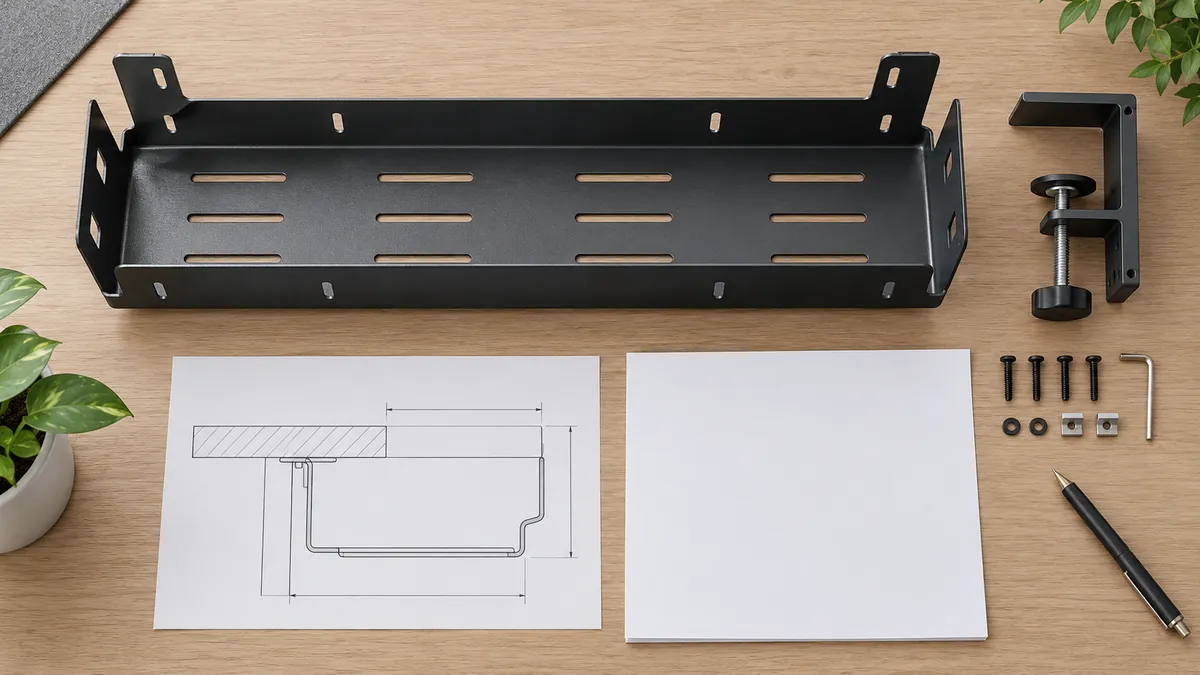
The final record should connect the named desk interface to its drawing revision, mounting hardware and sample result.
Häufig gestellte Fragen
Is the desk top thickness enough to specify a clamp-on tray?
No. The thickness at the actual clamp point matters, along with any lip, radius, reinforcement, apron or underside obstruction. Include a side profile and the position of the mount.
Can one sample prove that a tray fits every desk?
No. It shows the tested configuration under the conditions recorded. List each desk family or agree on a defined interface envelope, then review only the range that has evidence.
Should buyers specify a load rating in the RFQ?
If a load requirement matters, provide the application, intended contents and the responsible engineering acceptance criteria. This article does not establish a rating or test method for a particular product, and a buyer should not infer one from a product photograph or a competitor listing.
Does a clamp avoid all desk damage?
Not necessarily. The contact design, surface, installation and use conditions all matter. Specify any pad or protective part and inspect the actual assembly, but do not promise scratch-free performance without evidence for the named setup.
Does a cable tray make a desk electrically safe?
A storage accessory does not by itself prove electrical safety. Keep electrical and fire-safety claims outside a fit check unless the complete product, configuration and applicable requirements are evaluated by the responsible qualified party.
Does this article confirm Koitor manufactures under-desk cable trays?
No. This is adjacent sourcing guidance based on metal-product drawing and sample-review questions. Koitor’s exact capability for a cable-tray project must be assessed from the buyer’s drawing and confirmed by the factory before a commercial commitment.
Quote comparison and reorder controls
A strong importer brief connects the desk edge, underside obstructions, mounting route, usable tray dimensions, included hardware and tested sample configurations. Define what the sample proves, preserve the drawing revision and avoid broad fit claims beyond the documented range. Where the design is adjacent to a supplier’s established categories, request a project-specific manufacturing review and keep unverified capability, load and safety assumptions out of the RFQ.
Arbeiten Sie mit Koitor Hardware zusammen
Need to Review a Metal Storage Product Drawing?
Share a drawing or reference sample, intended mounting interface and the buyer’s fit questions. Koitor can discuss whether the specific metal product brief is within the factory’s confirmed project scope before quotation.
OEM / EIGENE MARKE
Verwandeln Sie diesen Beschaffungsleitfaden in ein Produktdossier
Teilen Sie uns Ihr Zielprodukt, die Größe, die Oberflächenausführung, die Bestellmenge und Ihre Verpackungsanforderungen mit. Ihr Team erhält vor der Angebotserstellung eine praxisorientierte Prüfung der Herstellbarkeit.

 English
  Español
  Português
  Français
  Deutsch
  العربية