
EAN vs UPC is a comparison of retail product identification and barcode conventions, not a choice between two factory SKU systems. A common comparison is EAN-13, which carries a 13-digit Global Trade Item Number, and UPC-A, which carries a 12-digit GTIN. Other forms exist, including UPC-E, so “every EAN has 13 digits and every UPC has 12” is too simple. Buyers should keep the assigned product identifier, barcode symbol, package level, and retailer artwork instructions separate.
For a hardware importer, the practical task is to confirm which trade item is being identified, which GTIN is assigned to it, what symbol format the channel requires, and whether the actual artwork and print meet the recipient’s instructions. Do not add, remove, or rearrange digits to make one format look like another. A barcode guide cannot allocate identifiers or guarantee retailer acceptance.
Identifier and barcode are not the same thing
A GTIN identifies a trade item according to the applicable GS1 system. A barcode is a machine-readable symbol that can encode an identifier. The number and the symbol relate to one another, but they are different attributes. The package artwork may include both the printed human-readable digits and the bars, but a visual mark does not itself establish that the number is valid, assigned to the correct product, or accepted by a retailer.
This distinction helps resolve many “EAN vs UPC” questions. First define the item being sold: a single hook bar, a two-piece set, a multipack, or a retail carton may represent different trade items. Then identify the assigned GTIN and the required symbol. The barcode artwork should correspond to the correct GTIN and actual package level.
Do not treat a factory product code, internal SKU, purchase-order number, carton code, and GTIN as interchangeable. An internal SKU is a buyer’s or supplier’s identifier for its own records. A GTIN is used to identify a trade item within the GS1 system. A carton or logistics unit can have its own identification needs. Keep the data fields distinct in the product master, BOM, packaging specification, and order documents.
Common EAN and UPC forms
EAN-13 and UPC-A are common retail barcode forms. EAN-13 carries a 13-digit GTIN; UPC-A carries a 12-digit GTIN. Depending on the relevant system and application, shorter or other symbol forms may also be encountered. GS1 US describes common EAN and UPC forms and discusses UPC-E as a shortened form in appropriate contexts.
These facts do not mean that one format is universally accepted by every retailer, marketplace, point-of-sale system, or country. Retailer instructions, marketplace rules, product category, package dimensions, and the buyer’s own account or identifier arrangements can change what is required. Confirm the current instructions for the actual channel and trade item before releasing artwork.
| Pergunta do comprador | O que identificar | What not to infer |
|---|---|---|
| Which item is being identified? | Each saleable trade item and package level | That one number automatically covers a multipack or inner pack |
| What number is assigned? | The authorized identifier and its product-master record | That digits can be changed to create another valid code |
| Which symbol is required? | The format specified for the recipient and application | That EAN is only for Europe or UPC only for North America |
| Is the artwork ready? | Correct number, symbol, placement, size, contrast, and package version | That a correct-looking graphic guarantees a successful scan |
| Who approves release? | The brand owner, retailer, marketplace, or designated data owner | That a supplier or factory can approve the retailer’s requirements |
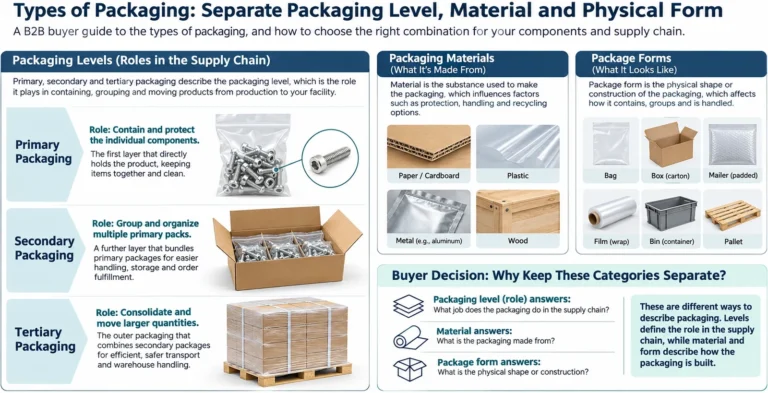
The distinction between identifier and symbol is especially important when a buyer changes package configuration. A single product may be sold individually, as a set, and in an outer carton. Each item level may have different identification and shipping requirements. Assignments and logistics identifiers should be managed by the authorized brand or data owner, not improvised during printing.
Regional use is not a substitute for channel instructions
EAN and UPC are often described as “European” and “American” codes. That shorthand can mislead buyers into assuming that geography alone determines which symbol is acceptable. A product may move across borders, sell through multiple channels, or use packaging configured for a particular retailer. The format should be chosen according to the assigned identifier and actual recipient requirements.
Do not infer that an EAN symbol will automatically work in every North American retail program, or that a UPC is forbidden outside North America. Also do not assume that broad point-of-sale compatibility equals acceptance by a specific retailer. Technical compatibility, account setup, product data, packaging artwork, and buyer instructions are related but separate checks.
If a distributor supplies several markets, ask who owns the global product data and whether one package version is intended for all channels. A multilingual label or multi-market package may have different dimensions and artwork constraints from a country-specific pack. The number, symbol, human-readable text, and surrounding label must remain aligned with the approved product record.
A hardware SKU example
Consider a hypothetical private-label shower caddy sold as a single boxed item and also as a two-unit promotional set. The single unit and the set may be separate trade items. Their packaging, product data, and assigned identifiers must be managed accordingly. The outer shipping carton may require a different logistics identification approach from the retail package. The buyer should not copy the single-unit code onto the set simply because the products inside are similar.
Keep these records together:
- The brand owner’s product master record and assigned identifier.
- The exact item or package level the identifier represents.
- The approved symbol format and artwork file.
- The packaging revision and label location.
- The recipient’s written requirements, where available.
- The party responsible for identifier allocation, artwork approval, and print verification.
This example is a process illustration, not a claim about any named retailer or a universal set-pack rule. The relevant brand owner and channel requirements control the final decision. Koitor can coordinate confirmed packaging information within an OEM project, but it should not be described as assigning GTINs, registering products, approving retailer data, or guaranteeing barcode performance.
Artwork and print release checks
Verify the source number
Use the authorized product-data record as the source of truth. Compare the digits in the artwork with the approved identifier and confirm that they belong to the intended trade item. Have the responsible data owner resolve mismatches. Do not manually edit the digits or use a free online generator as a substitute for authorization.
Confirm the package level
Check whether the symbol identifies an individual item, multipack, case, or logistics unit. Review the actual package that will carry it. A correct number attached to the wrong package level can still cause a receiving or scanning problem.
Follow the recipient’s current artwork instructions
The buyer, retailer, marketplace, or brand owner may specify symbol size, placement, quiet zones, contrast, orientation, print method, or additional label fields. This article does not reproduce normative dimensions or retailer-specific instructions. Use the applicable current documentation for the exact product and channel.
Inspect the final printed package
Review the production artwork and a representative printed sample against the approved file and pack. Confirm that the bars are clear, the human-readable digits match, the label is not obscured by a seam or fold, and the symbol is not distorted by a curved or reflective surface. These are practical visual checks, not a substitute for any required verification procedure.
If there is no physical sample yet, treat the digital proof as a preliminary review only. Confirm the production sample before treating the printed execution as approved.
Keep the approval attached to the package revision and intended sales channel.
Keep artwork revisions controlled
Record the artwork version, GTIN, package level, approval date, and supplier or printer responsible for output. If the product, pack count, market, or brand changes, ask the data owner whether the identifier or artwork must be revised. Never recycle or alter an identifier based solely on a packaging redesign assumption.
Coordinate the product record, sample, and order
Barcode release works best when it follows the product’s own change-control process. The brand or authorized data owner should maintain a record that connects the identifier to the correct trade item. The product team should define the product configuration and pack count. The packaging owner should control the artwork file and production revision. Procurement should ensure the supplier’s quotation and purchase order reference the approved package version. Quality staff or the designated verifier can check the sample and any required scan evidence.
These roles may belong to one person in a small team. Still, write down who is responsible for each approval. A supplier may be asked to place buyer-provided artwork, but that does not automatically make the supplier responsible for assigning the GTIN or deciding whether a retailer’s data record is correct. A clear division avoids the situation in which each party assumes another has confirmed the identifier.
Before approving a sample, compare the printed digits and symbol against the released artwork and product data. Check that the item name, pack count, color or finish variant, and package level match the product record. If a label is applied after assembly, verify that the location remains readable and does not cover instructions, a seam, a mounting part, or another required label. If the barcode is printed directly on a curved or reflective surface, the packaging or print specialist should confirm the chosen method.
At production release, ensure the approved artwork is the file actually supplied to the printer or pack-out provider. Maintain a version name and date, and archive superseded art so it cannot be selected accidentally. If a supplier changes its print process or material, determine whether a new sample review is appropriate. A proof image on a computer screen does not show every output issue that can occur after printing, folding, lamination, or application.
For a product sold across multiple channels, build a small matrix rather than assuming one rule. The matrix can list the trade item, package level, identifier owner, symbol or label requirement, market/channel, instruction source, artwork revision, and approval status. Mark unknown requirements as open. Do not fill a blank with a guess based on geography or a neighboring product.
If information conflicts—for example, the buyer’s product master has one number and a retailer file contains another—hold the affected artwork until the responsible data owner resolves the mismatch. Changing the digits at the factory may make the printed package appear consistent while leaving the underlying product record wrong. Keep the discrepancy and its resolution in the release file so the same problem does not return on the next order.
This coordination approach applies beyond bathroom hardware. It is a general package-control method, not a promise about any particular retailer’s system. The actual brand, marketplace, or retail partner instructions govern. For a Koitor OEM project, the product and packaging scope should be clearly separated from identifier services that the company has not confirmed it provides.
Keep human-readable data legible
Where the package design includes digits beneath the bars, compare them with the approved identifier before print release. The human-readable line helps a person inspect the data, but it is not a replacement for the encoded symbol. Conversely, a scanner reading the symbol does not confirm that the visible digits, product description, and listing record all agree. Treat them as linked checks against the same approved source.
Check the package after physical changes
A new carton board, label coating, shrink film, seam, or package shape can change where and how the symbol is presented. If the artwork is moved or scaled, have the packaging owner confirm that it remains within the recipient’s instructions. Do not assume a mark that worked on the old box will remain equally legible on a revised pack. A change to the package can warrant a fresh proof or sample review even when the GTIN itself does not change.
Record what the sample proves
Sample approval should state its scope. One review may confirm product configuration and artwork placement; a separate procedure may be needed for encoded data or print verification. Write down what was checked and who approved it. This keeps later teams from interpreting “sample approved” as a blanket confirmation of retailer registration, identifier assignment, and every barcode performance requirement.
Reconcile carton and retail labels
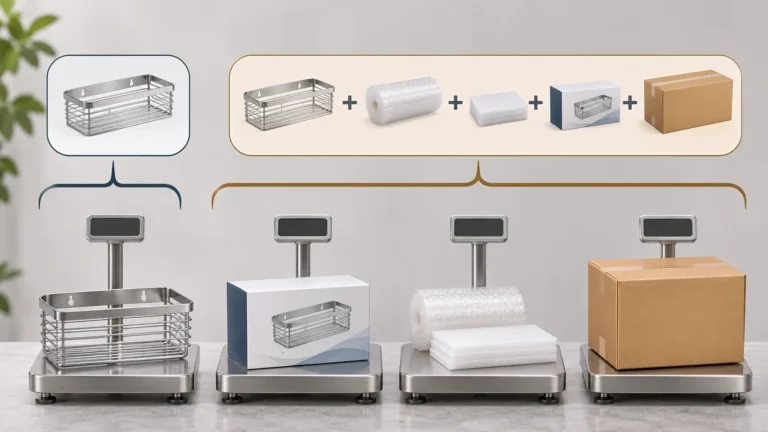
The retail unit and the shipping carton serve different identification purposes. Keep the retail trade-item data distinct from case or logistics data, and confirm whether the recipient expects separate labels. The package supplier should work from approved files for each level. A shipping mark, purchase-order reference, or warehouse label should not be mistaken for a retail GTIN.
Keep label responsibility explicit in the purchase order and artwork approval record so a late change is reviewed by the data owner.

EAN vs UPC: common retail formats
Treating a factory SKU as a UPC or EAN
An internal stock code does not become a GS1 identifier because it is printed beneath bars. Keep internal item numbers and trade-item identifiers separate, and use the authorized record for retail artwork.
Changing digits to fit a preferred format
Do not add, drop, or rearrange digits to turn one format into another. Identifier structure and symbol generation follow their governing system. The authorized data owner or GS1 member organization should resolve identifier questions.
Assuming the code proves retailer acceptance
A valid-looking barcode does not prove that the product is registered correctly, that the retailer has matching data, or that the package follows its rules. Get actual recipient instructions and verify the product record.
Applying one code to every package configuration
Single units, sets, and cases can represent different trade items or logistics units. Confirm the correct level rather than copying an existing label.
Treating a successful scan as complete approval
A scan test can show that a particular symbol is readable under a particular setup. It does not by itself establish that the correct identifier is assigned to the product or that the artwork meets every channel rule. Confirm both identity and readability requirements.
Overgeneralizing by geography
Regional terminology is useful shorthand but not a substitute for current buyer instructions. Confirm the format requested for the actual market, customer, and package.
Manage identifier data through product changes
A product can change its pack count, bundle configuration, brand, or sales channel while retaining a similar physical appearance. The authorized data owner should determine whether the trade item has changed and whether a new identifier is required under the applicable system. The factory should not make that determination from a revised carton or a new product photograph.
Keep an approval record that connects the GTIN to the item description, variant, packaging level, and effective date. When a product moves from an individual unit to a promotional bundle, update the product data and packaging work instruction together. If the bundle is temporary, record its validity period and the disposition of remaining stock. These controls reduce the chance that old artwork or an identifier for another pack configuration is reused.
For a retailer onboarding file, verify that the description, brand, dimensions or other requested product attributes refer to the same trade item as the barcode. A correct symbol on a package does not repair inaccurate item data in a separate catalog. The retailer or marketplace may impose its own format and data requirements, so the brand owner should retain the current instructions and the version used for approval.
If artwork is supplied by a buyer, identify its version and approval in the purchase order. If a supplier prepares a proof, have the authorized data owner check the digits before printing. A last-minute substitution of a label, package, or SKU should trigger a review of the affected fields. Do not assume that the number remains correct simply because the product itself has not changed.
Buyer checklist before package release
- What exact product and package level does this identifier represent?
- Who assigned or controls the identifier, and where is the approved record?
- Does the number in artwork match that record exactly?
- Which symbol format is required by the actual retailer or sales channel?
- Are the current artwork and packaging instructions available in writing?
- Does the label match the final product revision, count, and market?
- Has the printed sample been checked for legibility and placement?
- Is any required barcode verification performed by the responsible qualified party?
- Who approves changes to the identifier, artwork, or package configuration?
- Are case or logistics identification needs managed separately from retail GTINs?
Use this checklist as a release handoff. It does not assign numbers, generate compliant barcode art, or guarantee scanning or retailer acceptance. When requirements conflict, stop artwork release and ask the authorized identifier owner and recipient to resolve the issue.
Perguntas frequentes
What is the main difference between EAN and UPC?
The common EAN-13 format carries a 13-digit GTIN, while UPC-A carries a 12-digit GTIN. Other forms exist, and the correct selection depends on the assigned identifier and actual application.
Is EAN only for Europe and UPC only for North America?
That is an oversimplification. Regional use patterns do not replace channel-specific requirements. Confirm what the actual retailer, marketplace, or buyer requires.
Can I change an EAN into a UPC by removing a digit?
No. Do not edit identifier digits to create a different code. Use the authorized product data and obtain guidance from the responsible identifier owner.
Does a readable barcode mean the product is approved?
No. Readability is only one possible check. The identifier must also be correct for the trade item, and the package must follow applicable buyer requirements.
Does each package size need its own identifier?
The product owner should determine identifier assignment for each trade item and package level under the applicable GS1 rules and channel requirements. A buyer should not infer the answer solely from physical similarity.
Sources and scope
- GS1 US: EAN vs UPC — used for common format distinctions and bounded discussion of UPC-E; not used to promise universal retailer or point-of-sale acceptance.
- GS1: EAN/UPC barcodes — consulted for official page context; full body access was unavailable, so no detailed normative claims are attributed to it.
This article is an explanatory comparison, not an identifier-allocation service, barcode-generation specification, legal opinion, or guarantee that a package will be accepted by a retailer.
Trabalhe com a Koitor Hardware
Align product packaging before artwork release
For a private-label bathroom or home-storage hardware project, share the product configuration, pack count, artwork revision, package dimensions, label placement, buyer-provided identifier, and recipient instructions. Koitor Hardware is a family-owned custom metal hardware factory focused on bathroom and home-storage products. Identifier assignment and retailer approval remain with the authorized brand and channel owners.
Review a Private-Label Packaging Brief
Send the product drawing or sample, package configuration, approved artwork and identifier information, target quantity, and any current recipient instructions. Koitor can discuss confirmed product and pack-out details within the OEM project scope; barcode assignment and channel acceptance must be confirmed by the authorized owner.
OEM / MARCA PRÓPRIA
Transforme este guia de fornecimento num resumo do produto
Indique o produto pretendido, as dimensões, o acabamento, a quantidade a encomendar e os requisitos de embalagem. A sua equipa receberá uma análise prática da viabilidade de fabrico antes da apresentação do orçamento.

 English
 Español
 Português
 Français
 Deutsch
 العربية