
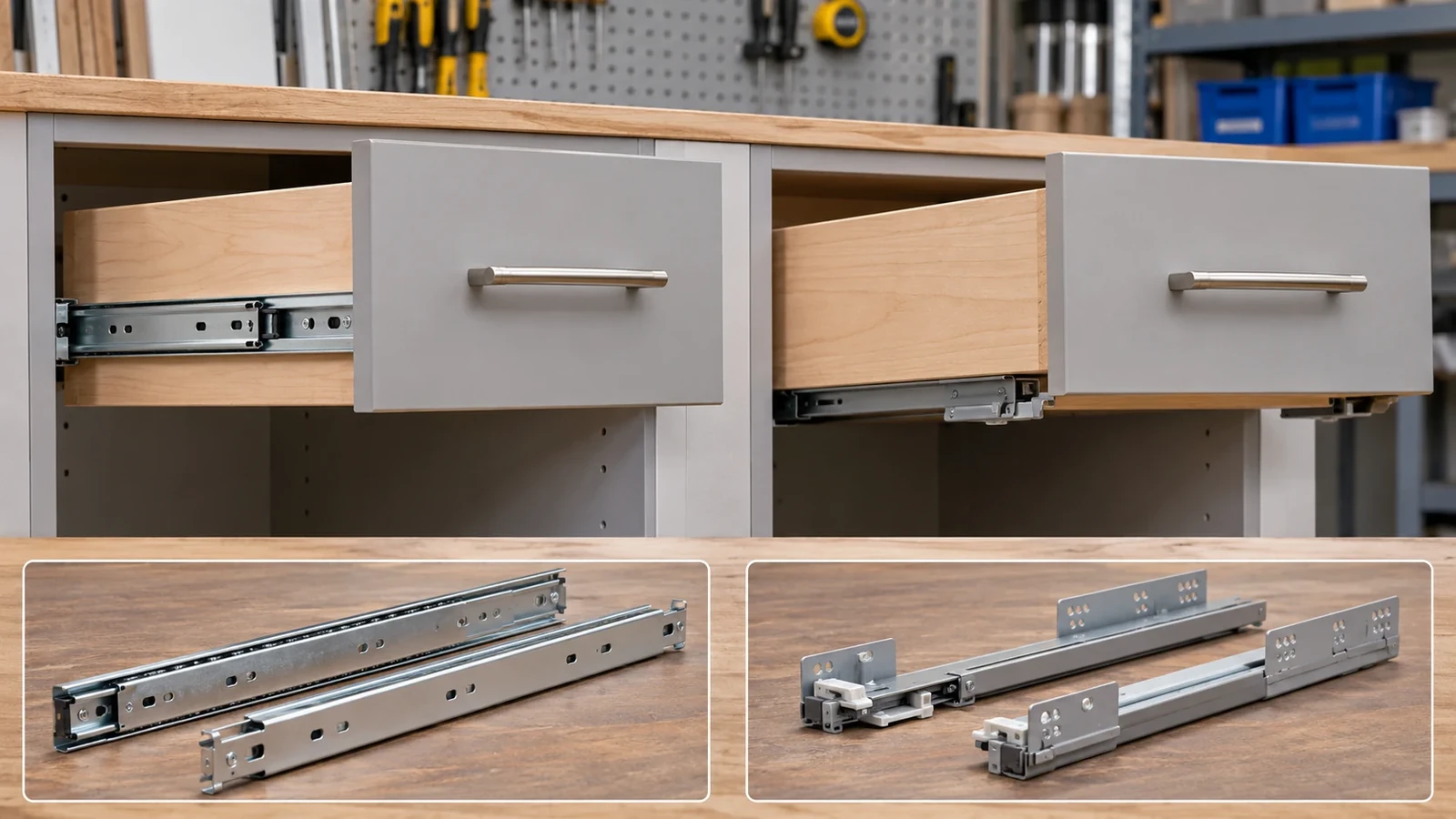
Drawer slide types are best compared on separate axes: mounting arrangement, member and bearing mechanism, extension travel, and optional motion features. A side-mounted slide with soft-close, for example, is still classified by its mounting location; “soft-close” describes an operating option, not a different mounting type. Before ordering, identify the actual slide system, drawer or basket dimensions, cabinet opening, included clips or disconnects, finish, and supplier’s model-specific clearance and load instructions.
What problem does a drawer-slide guide solve?
A buyer choosing slides for a cabinet drawer or pull-out wire basket may see side-mount, undermount, center-mount, full-extension, roller, ball-bearing, push-to-open, and soft-close terms presented together. These terms do not all answer the same question. If they are treated as one list of interchangeable “types,” buyers can miss an interface requirement or compare quotations for different configurations.
A drawer slide is part of a system. The slide members attach to the cabinet or frame and to the drawer or basket. The system also depends on opening width, drawer depth, member placement, clips, screws, front adjustment, disconnect features, clearances, load conditions, and installation instructions. The product name alone does not tell a buyer whether the slide fits the chosen drawer.
This article is an identification and procurement guide. It does not prescribe a universal clearance, load rating, slide length, extension percentage, or cabinet modification. Those details vary by the selected model and must come from the supplier drawing and instructions.
A drawer slide types comparison should record at least four distinct decisions:
- Where the slide mounts relative to the drawer: side, beneath, center, or another physical location.
- How the slide members move: ball, roller, bearing, rail, or another model-specific mechanism.
- How far the drawer travels: partial, full, over-travel, or a defined stroke.
- Which optional actions are required: soft-close, push-to-open, disconnect, detent, lock, progressive movement, or another feature.
Why do catalogs mix slide classifications?
Catalogs often list mounting, mechanism, travel, and function together because each helps buyers choose. But these labels cross. A side-mounted slide can have full extension and soft-close. An undermount system may include a disconnect clip and a specific adjustment feature. A center-mounted slide can use a different mechanism and travel. The buyer should treat each term as an attribute and confirm the actual model.
| Attribute | Common labels | What the label describes | What to confirm |
|---|---|---|---|
| Mounting | Side, under, center, bottom | Physical location and attachment arrangement | Fixed and moving members, drawer preparation, cabinet interface |
| Mechanism | Ball-bearing, roller, rail or model-specific system | How the members are guided | Exact model, installation orientation, maker instructions |
| Extension | Partial, full, over-travel | Travel relative to the closed position | Actual closed and open envelopes and maker definition |
| Motion feature | Soft-close, push-to-open, detent, lock | Optional opening or closing behavior | Whether feature is included and conditions for operation |
| Service feature | Disconnect, release clip, adjustment | How members separate or align | Included parts, direction of release, reassembly instructions |
This mapping prevents a buyer from comparing a “full-extension side-mount slide” with a “soft-close undermount pair” as though one label makes them directly equivalent. Align each axis and the installation scope first.
The Sugatsune drawer-slide basics explicitly distinguishes mounting location from extension and other mechanisms or functions. Liberty Hardware’s slide selection guide describes common mounting arrangements and notes that a replacement can require changes to the drawer or cabinet. Rockler’s drawer-slide guide also illustrates model-dependent preparation. These sources support the classification logic; their dimensions and model-specific instructions should not be generalized to another slide.
Which drawer-slide mounting arrangements should buyers identify?
Side-mount slides attach at the sides of the drawer and cabinet. Buyers should identify the exact member position, drawer width, opening width, side clearance, fastener locations, and any disconnect or adjustment hardware. Do not assume that every side-mount slide uses the same clearance or mounting envelope.
Undermount slides attach beneath the drawer, often as a paired system with model-specific clips or locking devices. The bottom geometry, drawer construction, member spacing, front and rear interfaces, and cabinet preparation matter. Catalog terms vary, so describe the physical location and identify the model instead of relying on a generic word such as “bottom.”
Center-mount slides are arranged centrally beneath a drawer or assembly, according to a defined design. The actual rail, support, drawer bottom, and cabinet interface control compatibility. Do not infer travel or load performance from the center-mount label alone.
Bottom-mount labels can be used broadly in product listings and may not map identically to “undermount” across suppliers. Ask the maker for a drawing showing the physical mounting arrangement. If the slide is attached beneath the drawer but uses a side-style member placed flat, that does not automatically make it an undermount system designed for the same clearances or clips.
Specialized slides may use unusual geometry for keyboard trays, pull-out shelves, heavy equipment, or other products. A specialized appearance does not determine the model’s load, stroke, or installation requirements. Use the manufacturer’s part number and installation document.
The mounting decision should be made with the actual cabinet or metal frame drawing. Mark which member is fixed, which member moves, where screws are placed, how the drawer aligns, and whether the slide is installed before or after the cabinet or basket is assembled. A supplier can then check whether the chosen slide fits the structure. In a retrofit, the existing opening and fastener holes may constrain the mounting choice; in new product development, the cabinet or basket can be designed around the selected slide. These are different sourcing situations, so tell the supplier whether the project is a replacement, a new design, or a revision to an existing SKU. If old hardware must be reused, identify the model and measure the installed envelope rather than assuming the original catalog dimensions are still available.
A drawer that must clear a front frame may need different preparation from a frameless opening. A pull-out basket may also require lateral brackets or a support frame that changes the slide’s mounting plane. The product team should include those structural parts in the sample-fit review. Do not treat the slide as a stand-alone purchase when the metal carrier defines its position.
How do extension, mechanisms, and motion features differ?
Extension describes how far a moving member travels relative to the closed position, using the supplier’s definition. Terms such as partial extension, full extension, or over-travel should be tied to the model. A label does not establish a universal percentage or actual usable access. Confirm the closed and open dimensions on the product drawing.
Mechanism describes how the slide moves. Ball-bearing, roller, or other arrangements refer to components and design used by a specific system. A mechanism name may help identify a product but does not by itself establish smoothness, noise, lifespan, or capacity. The exact model and test evidence control those claims.
Soft-close describes a feature that controls some part of closing motion. It is an option or function, not a mounting classification. Verify whether it is integrated, separate, or model-specific and whether the drawer, load, and installation fall within the maker’s instructions.
Push-to-open describes an opening action initiated by pressing the drawer or front, in models designed for it. The required face gap, preload, compatible front, and adjustment are product-specific. It should not be assumed to exist because a slide is concealed or full-extension.
Disconnect or release describes how the moving member can be separated from the fixed member, if the model supports it. Identify the lever, clip, or action, and whether the assembly must be reconnected in a particular way. A slide without the same release feature is not automatically an equivalent replacement.
Detent, lock, and progressive movement describe other model-specific behaviors. A detent may locate or resist movement at a defined position; a lock may hold a slide in a state; progressive movement may coordinate nested members. These feature labels require the exact supplier explanation and should not be generalized to all products within a mounting family.

When a buyer compares a feature, define what the user needs to experience. “Smooth” or “quiet” may mean different things without a sample and review method. “Full access” should be tied to the actual drawer depth and travel. If the product requires a named feature, record it on the drawing and verify that the quoted model includes it.
What interfaces must be checked before ordering?
Drawer slides require careful matching to both fixed and moving structures. The cabinet opening, drawer or basket width, side or bottom geometry, drawer depth, slide member length, mounting plane, and fixing points all matter. A nominal drawer size or slide length does not provide every clearance needed for the installation.
For a wire basket or metal pull-out assembly, the slide may attach to a frame, side bracket, adapter, or mounting plate instead of a conventional wood drawer. Identify the actual carrier and whether the slide supplier permits that arrangement. Koitor’s metal hardware scope can include custom storage structures and assemblies, but the slide mechanism itself may be supplied by a specialist; the project should record who owns the slide model and its performance data.
Mark critical interface information:
- Cabinet or frame opening width, height, depth, and mounting planes.
- Drawer or basket overall dimensions and the surfaces where members attach.
- Slide model, member orientation, nominal length, and actual closed/open envelope.
- Required clearances and tolerance source from the selected slide maker.
- Fastener locations, hole slots, screw type, and installation access.
- Front panel, clips, sockets, locking devices, disconnects, and adapters.
- Motion path, stops, obstruction zones, and desired extension.
- Any finish or coating that changes the contacting surface or clearance.
- The assembly sequence and which supplier installs each part.
Do not copy a generic half-inch clearance or a universal length rule into a custom design without checking the slide’s own drawing. A specific manufacturer may specify a side gap, bottom clearance, clip, or preparation for one model; another system can differ. If the supplier changes the model, require a dimensional and fit review.
A prototype should use the actual slide and representative drawer or basket. Check that members are parallel, mounting is square, fasteners do not interfere, clips engage, and the drawer travels as intended. A fit check is not a load or cycle-life test. Keep those validations separate if a product claim requires them.
The existing guide on drawer-slide breathing tabs answers a narrower fixing-feature question. This page maps the broad type system; a selected model’s fixing tabs, extension, temperature behavior, disconnect, or corrosion test should remain with its specialized owner and maker documentation.
How should buyers compare quotations and model data?
A comparable quote should identify the actual slide model, mounting arrangement, pair or set quantity, member length, travel, features, and supplied hardware. Ask the supplier to list all assumptions and deviations from the drawing. “Drawer slide, full extension” is not enough if the interface, mounting, feature package, or load documentation differs.
Request the following fields when relevant:
- Manufacturer, part number, and drawing revision.
- Mounting location and orientation.
- Number of members, rails, clips, sockets, and adapters included.
- Extension type and actual travel according to the maker’s definition.
- Mechanism type and optional features included.
- Drawer or basket dimensions and preparation requirements.
- Cabinet or frame clearance and fixing requirements from the model instructions.
- Material and finish for the slide and mating hardware.
- Test conditions and claim scope for any load, cycle, corrosion, or noise statement.
- Sample and first-article acceptance plan.
- Packaging, labeling, left/right or handed parts, and set identification.
- Supplier change-notification and alternate-model approval rules.
A load rating, if one is provided, must be read with the manufacturer’s test and mounting conditions. Ask whether it applies to a pair or one slide, what member length and orientation were used, which drawer structure and screws were tested, and how the load was distributed. Do not extrapolate a rating to a wire basket, a different length, a different mounting orientation, or another installation without evidence.
Likewise, a product page’s soft-close, silent, or cycle-life statement applies to the named model and documented scope. If a buyer changes the drawer mass, front, mounting, temperature, or assembly, confirm whether the original data still applies. A catalog value is not automatically a product-wide guarantee.
What mistakes should buyers avoid?
Mixing mounting and feature labels. Side-mount, undermount, full-extension, soft-close, and push-to-open describe different attributes. List each required attribute separately.
Assuming bottom-mount and undermount always mean the same thing. Terms vary by catalog. Confirm the physical arrangement in a drawing.
Rotating one slide type and assuming it becomes another. Mounting position can change how members operate and what clearances apply. Follow the model’s installation instructions.
Selecting by closed length alone. Actual travel, drawer depth, front position, clips, and clearance determine the usable opening.
Ignoring paired and accessory components. Clips, locking devices, sockets, disconnect levers, and adapters may be essential to the system. Include them in the quote and inspection.
Mixing products from different models or suppliers. Visually similar rails may not share hole patterns, member dimensions, or engagement. Verify model compatibility.
Using generic fit values. A remembered clearance or length rule may not apply to the selected model. Use supplier drawings and sample review.
Treating one slide rating as a finished product rating. Drawer construction, pair configuration, fasteners, mounting, load distribution, and use conditions matter.
Approving the slide without its carrier. A metal basket or custom frame may have different mounting surfaces from the supplier’s illustrated drawer. Test the actual assembly.
Forgetting change control. A slide substitution can change travel, mounting, accessories, finish, or performance evidence. Recheck the product before approving the new model.
What should go into a drawer-slide RFQ checklist?
Before selecting or quoting a slide, document:
- Drawer, cabinet, basket, or frame drawing and revision.
- Opening dimensions, moving member dimensions, and required depth.
- Mounting location and orientation.
- Slide model, length, travel, mechanism, and required operating features.
- Included clips, sockets, disconnects, locks, stops, and fasteners.
- Clearance and hole requirements from the selected model drawing.
- Finished surfaces, contact points, material, and finish.
- Expected load or cycle requirement and evidence scope, if applicable.
- Sample, fit check, and movement acceptance method.
- Supplier identity and responsibility for slide versus metal carrier.
- Packaging, pair identification, and assembly instructions.
- Approved alternatives and change review conditions.
For a development sample, record which slide model was used and whether the drawer or basket was a production-intent part. Capture the installation orientation and any adjustments. If the team approves a substitute slide after the sample, confirm the model data and fit again; the old sample does not cover a new product automatically.
A buyer should also distinguish a product’s feature from a product claim. If the slide includes a push-to-open function, the listing can state that feature only for the model and setup that provide it. If a claimed load or cycle life is required, the evidence must match the system. Do not rely on an image of a slide to support hidden test conditions.

How can an OEM factory coordinate a slide and metal basket?
Koitor Hardware is a family-owned custom metal hardware manufacturer focused on bathroom and home-storage products. A project may combine a metal basket or frame with a purchased drawer slide. Koitor can discuss the custom metal structure, drawing, sample, and assembly scope; this does not mean Koitor manufactures every slide, ball-bearing mechanism, damper, or tested slide system.
For an OEM project, identify which company supplies and approves the slide. Send the slide model drawing together with the metal basket or carrier drawing. Mark the fixed and moving members, fastening surfaces, travel, required clips, clearance, finish, and packaging. If the slide supplier has installation instructions, preserve them with the project file and confirm who performs each operation.
A sample can help verify that the metal carrier attaches to the chosen slide and moves through the intended path. If a buyer needs a rating or cycle claim, the testing scope must include the selected model and representative assembly. The slide maker or qualified testing source should confirm the method and applicability.
For custom storage projects, see Koitor’s OEM home-storage hardware page or send the basket drawing and slide model to Koitor. Include a sample if the mounting faces or motion path are difficult to capture in a drawing.
Frequently asked questions
What should a drawer slide types chart compare?
A drawer slide types chart should separate side-mount, undermount, center-mount, and other physical locations from mechanism, extension, and features such as soft-close or push-to-open. Confirm the actual system in the manufacturer’s drawing.
Are bottom-mount and undermount slides the same?
Catalog terminology varies. Describe the physical mounting position and request the model drawing instead of assuming the labels are equivalent.
Is soft-close a mounting type?
No. Soft-close is an operating feature. A slide can be side-mounted or undermounted and may or may not include a soft-close mechanism.
Does full extension identify the slide length?
No. Extension describes travel under the supplier’s definition; length is a separate model dimension. Confirm both on the specific product drawing.
Can a side-mount slide be rotated flat and used as an undermount?
Do not assume so. Orientation can change clearances and operation. Use the slide only in the positions and systems covered by the maker’s instructions.
Do drawer slides always come as a pair?
Supply sets vary. Confirm whether the quote covers a pair, separate left and right members, clips, sockets, or other hardware required for assembly.
Does a slide rating apply to a wire basket?
Not automatically. Confirm whether the rating covers the exact slide pair, member length, mounting orientation, basket or drawer construction, fasteners, and installation.
What should I send for a slide quotation?
Send the cabinet opening and drawer or basket drawing, model or required attributes, clearances, mounting location, travel, function, finish, sample expectations, and evidence requirements.
Work With Koitor Hardware
Need a metal basket and slide interface reviewed?
Share the cabinet or frame drawing, basket dimensions, slide model, mounting surfaces, travel and clearance needs, and any evidence requirements. Koitor can review the custom metal carrier and project handoff while the slide maker confirms its model-specific instructions.
OEM / PRIVATE LABEL
Turn this sourcing guide into a product brief
Share your target product, size, finish, order quantity and packaging requirements. Your team receives a practical manufacturability review before quotation.


 English
 Español
 Português
 Français
 Deutsch
 العربية