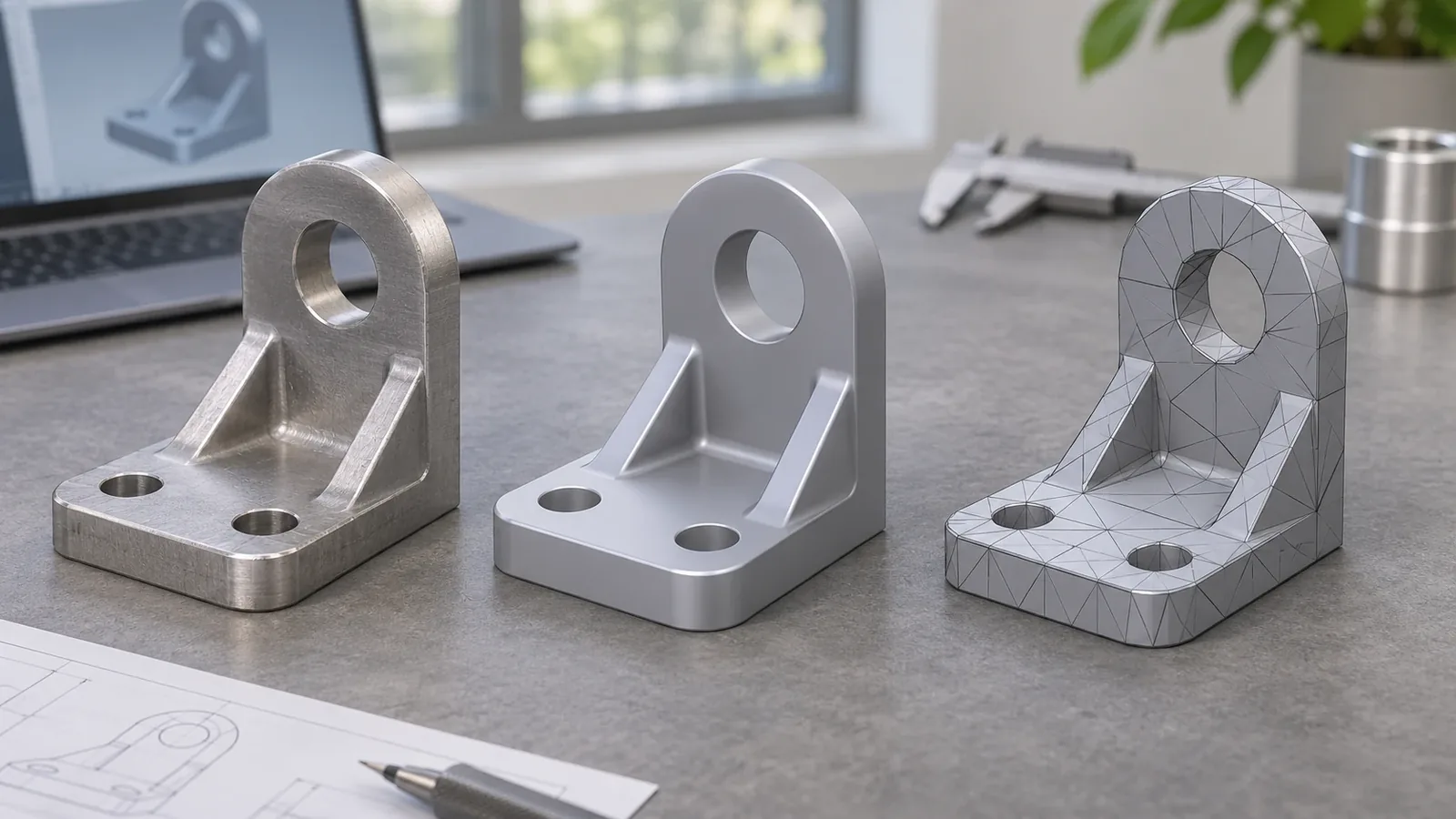
STEP vs STL is a comparison between two different ways of representing and exchanging three-dimensional model information. STEP is commonly used to exchange CAD or product-model data between systems; STL represents a surface as a collection of triangles. A STEP file may carry geometry in a form that a receiving CAD system can interpret according to the supported schema and import settings, while an STL mesh approximates the surface with facets. Neither file extension alone proves that a model is complete, correctly scaled, manufacturable, current, or ready for quotation.
For a hardware buyer, the right file depends on the next task. A model used for CAD review, dimensional discussion, or design exchange may require different information from a mesh intended for a triangle-based visualization or additive workflow. A file that opens is not necessarily a file that contains every drawing dimension, tolerance, material note, finish requirement, hole specification, or packaging instruction needed for manufacturing. Confirm the receiving team’s software, task, and model expectations before relying on a format.
What is the difference between STEP and STL?
STEP is a CAD exchange format, while STL describes a surface using triangular facets. A STEP file can exchange product-model geometry and related data depending on the schema, export settings, and receiving software; an STL file approximates an object’s surface with connected triangles.
The practical distinction is about representation, not simply file size or which format is “better.” A curved surface exported to STL is represented by many flat triangles that approximate its shape. Increasing mesh resolution may make the approximation look smoother, but it does not transform the triangle mesh back into the original analytic surface or recover the original feature tree. A STEP file can transfer geometry that the receiving system may use as CAD data, but that does not mean every STEP file preserves the designer’s native parameters, constraints, sketches, design history, dimensions, or product manufacturing information.
Autodesk’s Inventor documentation describes STEP as a CAD exchange option and explains that STL export approximates a model through flat facets. Its Netfabb documentation discusses the triangle faces used in STL meshes and why mesh validity matters in relevant workflows. These sources describe format concepts in the named products and versions. They are not universal promises about every CAD application, all STEP schemas, or every receiving workflow.
| Question | STEP | STL |
|---|---|---|
| What does it represent? | CAD or product-model exchange data, depending on export and import support | A surface approximation represented by triangles |
| What is it commonly used for? | CAD exchange and model review where the recipient supports the file content | Mesh-oriented visualization or additive workflows where the recipient requests a mesh |
| What should be checked? | Schema or export compatibility, units, bodies, surfaces, orientation and revision | Mesh completeness, orientation, scale, faceting and whether it is suitable for the intended task |
| What must not be assumed? | That native feature history, all annotations, or every manufacturing requirement is preserved | That a denser mesh restores original CAD surfaces or proves manufacturing readiness |
This table is a practical handoff aid, not a software compatibility guarantee. The recipient’s application and the imported model should be checked directly.
Which file should a hardware buyer send?
Send the representation the receiving engineer or manufacturer requests for the specific task, and confirm what information must accompany it. If the task needs CAD geometry or an exchange model, a compatible STEP export may be appropriate; if a recipient specifically needs a mesh for a mesh-based workflow, an STL may be requested. These are common patterns, not universal acceptance rules.
For a custom bathroom or home-storage product, the buyer should first distinguish a visualization from a production handoff. A rendered or mesh model can help communicate overall shape, but it may not define material, finish, tolerances, critical dimensions, weld requirements, mounting details, or acceptable variations. Even a good STEP model may omit those requirements unless the file or accompanying drawing explicitly includes them.
Before sending a model, ask the recipient:
- Which file types and specific versions or schemas can your team import for this review?
- Should the file represent one part, a complete assembly, or a specific configuration?
- Which unit system and coordinate orientation should be used?
- Should the export include only the final external geometry, or also internal features and components needed for the task?
- Are critical dimensions, tolerances, material, finish, and cosmetic faces defined in a drawing or written specification?
- Does the buyer expect a visual review, preliminary quotation, design-for-manufacture feedback, or production approval?
- How will the recipient confirm that the imported model matches the intended revision?
These questions prevent a common handoff gap: the sender shares a file but the parties silently assume different levels of detail. A model can show an overall bracket or rack while leaving a hole tolerance, weld location, surface finish, or mounting interface unspecified. For a STEP vs STL decision, the buyer should also ask which information must remain editable, which only needs to be visible, and which must be defined in a separate drawing or specification. A manufacturer may be able to discuss visible geometry and production considerations, but the buyer must still provide or approve requirements that are not encoded in the file.
For a broader drawing package, see the existing guide on STEP, DXF, and PDF file roles in a sheet-metal RFQ. That article owns the multi-file RFQ package decision. This page focuses on how STEP and STL represent model data and what changes when a surface is reduced to a triangle mesh.
What information can disappear or change during conversion?
Conversion can change how geometry is represented, and it may omit information that the destination format or export settings do not carry. The exact result depends on the source model, export options, schema, software, and import process, so buyers should inspect the actual converted file instead of assuming full information survives.
A CAD model can be tessellated into a mesh. This produces triangles that approximate the original surfaces. A coarse mesh may visibly approximate curves with larger facets; a finer mesh can use more triangles, but that still describes a mesh rather than restoring the original CAD model. A change in visual smoothness is not proof of a specified dimensional accuracy.
A mesh-derived STEP file does not automatically recover the original analytic surfaces, native feature tree, sketches, constraints, design decisions, or intent. Some software can fit or reconstruct surfaces from a mesh, but the result depends on the algorithm and the source data. Reconstruction should be treated as a new model that needs review, not as a guaranteed recovery of the original editable design.
The reverse direction has its own limits. Exporting a STEP model to STL may omit assembly metadata, colors, annotations, or other content depending on settings and recipient support. A triangle model may have a scale issue if units are not interpreted as intended. A mesh may have open boundaries, inverted faces, non-manifold conditions, duplicate surfaces, or other issues that affect a downstream process. A successful file save does not prove that the recipient’s application interprets the data correctly. The safest STEP vs STL handoff records what was exported, what the receiving party imported, and which checks were completed before the model supports a quote or revision decision.
A buyer should therefore preserve the original source model and clearly label any converted derivative. Record the conversion purpose, software and settings when relevant, units, orientation, revision, and who checked the result. If the derivative is used only for visualization, state that it is not the controlled design authority. If it will inform quoting or tooling, confirm that the receiving party has reviewed its critical geometry and identified any missing requirements.
Does STEP preserve every CAD feature and design intent?
No. A STEP file does not guarantee that every native feature, parameter, constraint, annotation, or design decision from the authoring application is preserved. The content depends on the schema, export settings, software implementation, and import capabilities on the receiving side.
Some exchange workflows transfer boundary representation geometry or other product-model data that the receiving system can use. But a buyer should not assume that a STEP file is identical to the native CAD document. Feature history may not transfer in the same form, and the recipient may see geometry without the original editable operations. Product manufacturing information or annotations may also depend on the chosen format options and application support.
This is why the file extension should be paired with a short handoff note. Identify the originating system and revision if known, say whether the file is a neutral exchange export, and list any dimensions or requirements that must be checked. Ask the recipient to confirm the important geometry after import rather than treating “opened successfully” as proof that every intended detail is intact.
For a quotation discussion, a supplier may need a drawing or written specification alongside the 3D model. The drawing can define dimensions, tolerances, material, finish, visible faces, and other acceptance requirements that a model may not communicate. A model’s geometry alone should not be used to invent those requirements.
Is STL always lower quality than STEP?
No. “Quality” depends on the intended use and the information needed for that task. STL is not automatically wrong if a recipient needs a mesh, and STEP is not automatically sufficient just because it is a CAD exchange format. The correct choice depends on the required representation, software support, geometry, units, revision, and downstream decision.
An STL with adequate tessellation can represent an object’s external shape well enough for certain mesh workflows. That does not make it a substitute for the design source. A STEP exchange file can be useful for geometry review, but it may still be incomplete, contain unwanted bodies, use an unexpected unit convention, or omit the annotations and specifications the project requires.
The buyer should avoid using “high resolution” as a proxy for tolerance or manufacturability. Mesh triangle count and visible smoothness do not establish dimensional acceptance. A model could look smooth on screen while its scale is wrong. Conversely, a coarse mesh may be unsuitable for some fine geometry but still be adequate for a visual discussion. The only safe conclusion is tied to the application and acceptance basis. The same mesh can be acceptable for a visual concept exchange and unsuitable for a task requiring precise editable surfaces. That does not make the mesh defective; it means the file has a particular role. Buyers should define that role in plain language and avoid asking a supplier to infer it from the extension. A format review should also distinguish a geometric representation from the contractual specification. Material grade, finish, tolerance, and acceptance criteria remain explicit project inputs even when the model depicts a detailed shape.
When comparing two supplier responses, ask what each file was used for. Did the recipient perform an import check, a visual comparison, a dimensional review, or only open the file? Was the result compared with a controlled drawing or the buyer’s master model? Those are different levels of review. A neutral exchange file can facilitate discussion, but it does not replace the agreed design-control process.
How should a buyer verify the model before handoff?
A buyer should verify the model’s identity, revision, orientation, units, completeness, and critical geometry in the receiving workflow. A simple opening check is useful but does not prove that the model is suitable for quotation, tooling, production, or a regulated application.
A practical sequence is:
- Confirm the file name, project code, part or assembly identity, and revision.
- Confirm whether the file is STEP, STL, or another format, and state the intended recipient task.
- Check that units and orientation are understood and that the model appears at a plausible scale.
- Confirm whether the file contains the intended parts and configuration rather than hidden, suppressed, or alternate geometry.
- Inspect critical interfaces, holes, bends, openings, mating surfaces, and other specified features after import.
- Compare the imported representation with the controlled drawing or design source.
- Identify requirements not shown in the file, including material, finish, tolerances, weld locations, load or function criteria, packaging, and labeling.
- Record who reviewed the model, which software or process was used, and what was approved.
- Keep the original model and label all mesh or reconstructed derivatives as derived files.
- Obtain the recipient’s confirmation that the file supports the agreed next step.
Not every review needs a formal inspection report. The amount of evidence should match the decision and risk. A preliminary concept exchange can be lightweight; a tooling or production release needs clearer revision control and acceptance requirements. Buyers should state the intended stage rather than leave suppliers to infer it.

What should be included with a STEP or STL file in an OEM RFQ?
A model should travel with enough information for the recipient to understand the intended part, revision, task, and acceptance expectations. The file format alone rarely contains every detail needed for a complete hardware quotation or production release.
For an RFQ, include the part or assembly name, drawing revision, intended use, material designation or options, finish, critical dimensions, tolerance requirements where defined, and any surface or cosmetic priorities. Identify mounting interfaces, weld or joint requirements, packaging needs, and the estimated order or sample stage when those details affect the quotation. If the design is still under development, mark open questions rather than leaving the supplier to guess.
A buyer should tell the supplier whether the model is the current source of truth or a reference visualization. If several files are sent, identify which one governs geometry and how differences should be resolved. A PDF drawing, a CAD exchange file, a mesh, and an email description can conflict. The buyer should establish precedence instead of assuming that the latest email attachment automatically supersedes the approved drawing.
For a metal bathroom accessory, two models may appear similar but differ in hole location, wall clearance, bend radius, or mounting plate geometry. Those differences can affect forming, welding access, finish coverage, assembly, or fit. A quote based on one file may not cover a later revision. Revision identifiers and change notes help both buyer and manufacturer keep the sample and bulk-production configuration aligned.
The general package should remain product-specific. Do not add a load claim, compliance requirement, coating test, or tolerance because a generic checklist names it. Use the buyer’s specification, target market requirements, and qualified engineering review to determine what actually applies. A complete RFQ describes the real decision and distinguishes confirmed inputs from assumptions.
What can Koitor Hardware confirm during model review?
Koitor Hardware is a family-owned custom metal hardware factory focused on bathroom and home-storage products. Its approved capabilities include drawing- and sample-based product development, metal forming, welding, polishing, powder coating, basic assembly, and packaging preparation. A model handoff can help start a discussion about product structure and manufacturing practicality, subject to the actual project and information supplied.
The approved company profile does not establish that Koitor uses a particular CAD package, accepts every file schema, provides 3D printing, reconstructs mesh files, performs automated geometry checking, or guarantees a quotation from a model alone. Buyers should confirm the desired file type and review task with the project contact before relying on a specific capability.
For a custom metal basket, towel rack, shower caddy, or other storage product, the buyer can share a drawing or physical sample alongside the relevant model and specification. The team can discuss the structure, finish, sampling scope, and information required for quotation. This is different from certifying the model, taking design responsibility, or approving a finished product’s engineering performance.
Learn more about Koitor’s OEM home-storage hardware manufacturing and provide the controlled model, drawing, revision, and intended review task when contacting Koitor.
Frequently asked questions about STEP vs STL
Are STEP and STP the same?
STEP is commonly used for the neutral CAD exchange format, and STP is a file extension often associated with STEP files. Confirm the recipient’s software support and the actual file content rather than relying on the extension alone.
Is STL only for 3D printing?
No. STL is a triangle-mesh format used by various mesh workflows, including some additive-manufacturing tasks, visualization, and inspection contexts. The recipient should specify whether an STL is appropriate for the intended purpose.
Can an STL be converted back into an editable CAD model?
A mesh can be processed or reconstructed into other geometry, but conversion does not automatically restore the original surfaces, feature history, parameters, or design intent. Any reconstructed model should be reviewed as a derivative.
Does STEP guarantee an accurate model?
No. A STEP extension does not prove that the export used the correct revision, scale, geometry, units, or settings. The imported model should be checked against the controlled source and project requirements.
Can a factory quote from an STL file?
That depends on the factory’s accepted formats, the model’s completeness, and the quotation scope. Buyers should confirm the recipient’s import capability and include drawings or written requirements for material, finish, tolerances, and other unmodeled information.
Does a smoother STL mean a more accurate product?
Not necessarily. A smoother appearance can result from more or differently distributed triangles, but it is not proof of dimensional accuracy or manufacturing tolerance. Verify the geometry against a controlled source and defined criteria.
Should STEP and STL both be sent?
Only if both files have a clear role and revision. If a buyer sends multiple representations, state which one controls geometry, what each supports, and how a discrepancy should be resolved.
Buyer checklist before sending a model
- [ ] Label the part, assembly, project, and revision.
- [ ] State whether the file is STEP or STL and what review task it is intended to support.
- [ ] Confirm the recipient’s current software and format requirements.
- [ ] Verify the imported scale, units, orientation, and critical geometry.
- [ ] Identify whether the model contains the intended configuration and all required components.
- [ ] Attach the controlled drawing or specification for dimensions, material, finish, and acceptance requirements.
- [ ] Mark surfaces, holes, mounting points, welds, and interfaces that must be reviewed.
- [ ] State which file governs if multiple versions or representations are included.
- [ ] Keep the original source model and identify any mesh or reconstructed derivative.
- [ ] Confirm who reviewed the handoff and what stage is approved.
- [ ] Treat the file as an input to discussion, not as proof of product qualification.
This checklist helps a buyer make a handoff clearer; it does not validate geometry or replace engineering review.

Need Help Preparing a Hardware Model for Review?
Share the model format, controlled drawing or sample, revision, material and finish requirements, and intended review task. Koitor can discuss the manufacturing context and confirm what project information is needed before quotation.
OEM / PRIVATE LABEL
Turn this sourcing guide into a product brief
Share your target product, size, finish, order quantity and packaging requirements. Your team receives a practical manufacturability review before quotation.


 English
 Español
 Português
 Français
 Deutsch
 العربية