

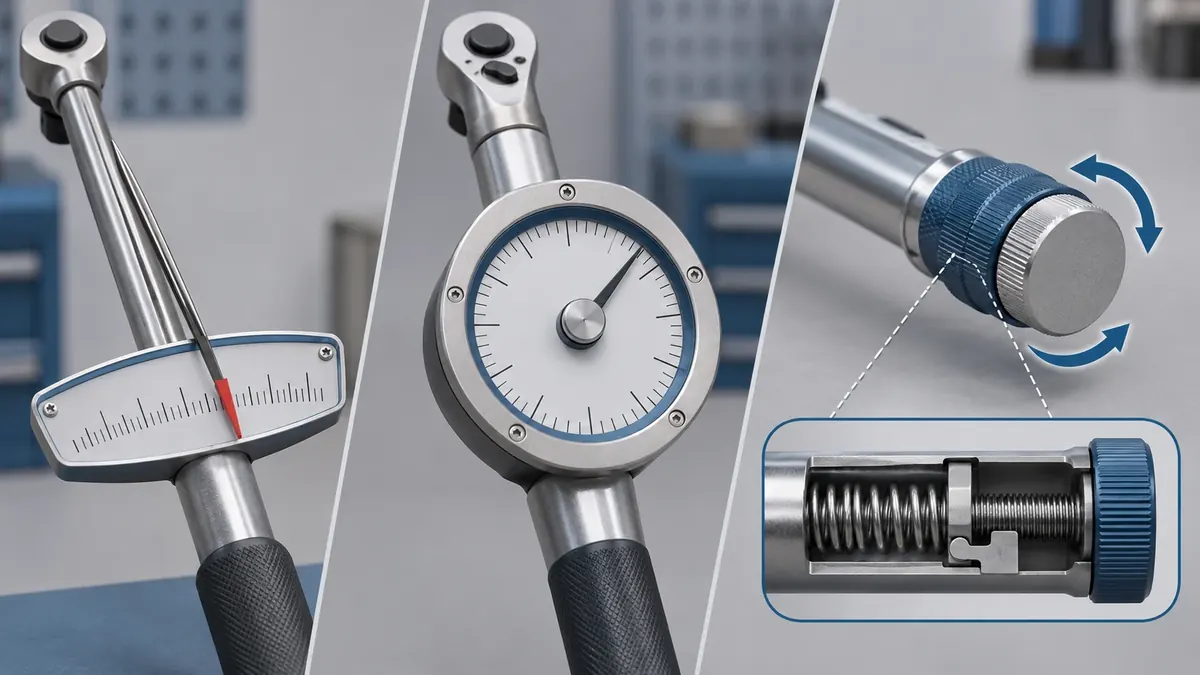
Torque wrench types are easier to compare when you separate three questions: how the tool indicates torque, what it does at a trigger point, and how the setting is controlled. A beam or dial tool can indicate a reading; a common click wrench signals a setting; a break-over design pivots; a cam-over tool releases or slips according to its model; and a digital tool may display a measured value or provide model-specific signals. “Preset,” “adjustable,” “click,” and “digital” are not mutually exclusive product categories. A documented hybrid can combine electronic measurement with a mechanical click. For a buyer reviewing a screw-assembled bracket or storage frame, the model instructions and approved joint requirement matter more than a short label on a quotation.
The Three Axes Behind Torque Wrench Types
A tool name often mixes several independent characteristics. That is why a list that presents beam, click, digital, preset, and adjustable as five equivalent boxes can confuse a buyer: some describe indication, some describe feedback or release behavior, and others describe setting control. A clear comparison begins by identifying what the tool shows to the operator, what happens as the applied torque approaches or reaches a selected condition, and how the target is set or limited.
Indication is the information available during use. A pointer moving against a scale is an indication. A dial face is another indication; the dial may show a current reading, and a particular model may include a memory pointer. An electronic display is also an indication, but the word “digital” by itself does not establish what the device records, signals, or exports. A click can be heard or felt, yet that feedback is not a numeric reading and does not necessarily disconnect power or prevent continued loading.
Trigger or release behavior describes the response at a model’s specified condition. A click mechanism provides a signal or deflection that requires an operator response. A break-over wrench pivots at its head or handle arrangement to tell the user to stop. A cam-over or slipper mechanism is designed around a release or slip action, but its exact action and reset requirements must be taken from the named model documentation. Similar sounds do not prove identical internal behavior.
Setting control asks how the target is selected or fixed. An adjustable tool can permit a user to change a setting within its documented method and range. A preset tool may be supplied for a selected setting or configured so the user does not routinely alter it. These terms describe control, not necessarily indication or trigger type. “Manual” and “powered” describe a different axis: the source of input. The matrix below keeps those ideas separate instead of claiming that the market has one universal number of wrench types.
| Tool family or label | What the operator may observe | Behavior at a stated setting | Setting question to confirm |
|---|---|---|---|
| Beam | Pointer movement against a scale | Reading continues to depend on the operator observing the pointer | Is the scale readable in the working orientation? |
| Dial | Dial indication; memory features depend on model | The maker’s instructions define any peak or memory behavior | Is a memory pointer present on this exact model? |
| Click | Audible, tactile, or both kinds of signal on a given model | Signal is not permission to continue pulling | How does the manual say to respond and reset? |
| Break-over | A visible or felt pivoting movement | Operator must stop when the specified break occurs | What direction, range, and access limits apply? |
| Cam-over or slipper | A model-specific release or slipping action | Exact release behavior must be verified in model instructions | What is the named mechanism and permitted application? |
| Electronic or digital | Display, signal, or record features that vary by model | It may or may not include a mechanical click or limiter | Which display, alarm, memory, and export functions are documented? |
This is an organizing aid, not a universal specification table. Manufacturers use names differently, product lines change, and some devices combine features. A correct procurement description therefore names the exact model and requested behavior rather than relying on one adjective.
Indicating Wrenches: Beam, Dial and Electronic Readouts
A beam wrench gives the user a direct visual relationship between handle deflection and a pointer on a scale. Park Tool’s use-and-care guidance describes beam tools as pointer-and-scale instruments and notes that the operator must observe the reading while applying force. That is a different work pattern from a tool that signals a threshold. The buyer should consider whether the scale can be seen from the operator’s position, whether the pointer can be read without twisting into an awkward posture, and whether the relevant units and range are clearly marked on the model.
A dial wrench also presents a reading, but the dial’s design and any memory pointer are model-specific. Do not assume that every dial stores a peak value, resets in the same way, or has the same viewing arrangement. A buyer comparing photographs should ask for the manufacturer’s exact model page or manual when a feature affects the process. A wide dial may be easier to see in some setups, but appearance alone does not demonstrate accuracy, calibration status, suitability for a joint, or operator fit.
Electronic and digital wrenches add a display or electronic logic, but that description does not settle whether the tool clicks, vibrates, lights an indicator, stores a result, or exports a record. Those are distinct functions. A displayed value may be useful for reading; an alarm may be useful as feedback; a saved data record may help traceability. None should be inferred from a digital screen in a product image. Confirm the functions, units, direction, range, drive interface, battery requirements, and any record format from the current maker documentation for the specific tool.
The label “indicating” is helpful when the buyer wants to know what the operator can see, but it does not itself define what the operator must do next. A beam pointer keeps moving with applied force; a dial reading can change as force changes; an electronic display may present a live or stored value depending on design. A click is instead a signal associated with a mechanism. A model can combine a reading and a trigger. This distinction prevents a specification from saying merely “digital torque wrench” when the actual request is for a visible result, an alert, or a documented record.
When comparing vendors, keep three records together: the proposed tool model, the manual revision or product page that defines its functions, and the buyer’s approved assembly requirement. If the offer changes from one brand or model to another, review the documentation again. A similar display or handle shape does not establish equivalent operating behavior. For metal hardware assemblies, the tool comparison should remain inside the buyer’s documented fastening process. It does not establish an appropriate torque value for a particular screw, finish, material, insert, or bracket.
Click, Break-Over and Cam-Over Behavior Is Not Interchangeable
A common click wrench provides feedback at a selected condition. The click is a prompt for an operator action, not a universal automatic cutoff. Park Tool warns that its click-style tools may deflect with little sound at low settings and that continued turning can over-tighten. This is a useful source-specific caution: the expected signal may be subtle, and the user must follow the actual tool instructions. Do not convert the presence of a click into a claim that the wrench physically prevents further torque.
Break-over tools use a pivoting action to signal a condition. Mountz’s TBIH break-over FAQ explains that the pivot tells the operator to stop. That behavior is not a universal promise that force cannot increase after the signal. The FAQ also has model and application boundaries, so its statements should not be extended to every break-over design. In a work instruction, describe the actual response required by the maker rather than writing “the wrench stops itself” unless the specific manual explicitly supports that wording and the process owner approves it.
Cam-over or slipper tools may release or slip through a mechanism intended to communicate that a condition has been reached. However, “cam-over” is not a substitute for reading the exact manual. Confirm the direction and range, how the tool is set, what action follows a release, whether it resets automatically, and any limitations on the application. Do not infer these points from an audible click or from a comparison chart that does not identify the model.
The word “trigger” can therefore conceal important differences. A click can be a sound or feel; break-over can involve a pivot; cam-over or slipper can involve release. What matters is the maker’s documented mechanism and the operator’s required response. A descriptive matrix should say “indicates,” “signals,” “pivots,” or “releases” only when supported for that model. It should not use “limits torque” as a catch-all phrase for an audible signal.
For the buyer’s evaluation, the most useful comparison questions are practical. Can the operator observe the event? Is the signal distinct in the intended environment? Does the manual instruct the user to stop immediately? Is continued input possible? Is there a documented reset or return-to-setting procedure? Are direction and application covered? These questions clarify workflow without claiming that one family is universally safer or more accurate. Tool selection remains dependent on the actual joint, access, operating process, and source documentation.
Preset, Adjustable, Click and Digital Can Overlap
“Preset” and “adjustable” describe how a value is established or changed; they do not necessarily describe how torque is indicated. A preset click tool and an adjustable click tool can share a trigger family while differing in setting control. That distinction helps a distributor or assembly buyer compare quotations accurately. If a buyer needs a fixed setting that is not routinely changed at the workstation, the word “preset” should be tied to a documented configuration and control method. If routine adjustment is required, the range and adjustment instructions should be confirmed for the exact model.
Likewise, “digital” and “click” do not always conflict. Stahlwille’s 714 ReClick documentation describes a named product that combines electronic measurement with a mechanical click. This example is sufficient to show why the labels are not mutually exclusive; it does not imply that every digital wrench has a click, or that every hybrid has the same functions. A specification should record both axes: the tool’s measurement or indication, and its trigger behavior. Then it should list whether the setting is preset or adjustable.
A practical label matrix could describe a candidate as “electronic indication; mechanical click; adjustable within the documented range.” Another candidate might be “beam indication; no click signal; manually observed.” A preset mechanical click tool would be recorded as “mechanical trigger; supplied preset; operator follows model instructions.” These descriptions communicate more than a single product-family noun and invite the supplier to confirm the exact item being quoted.
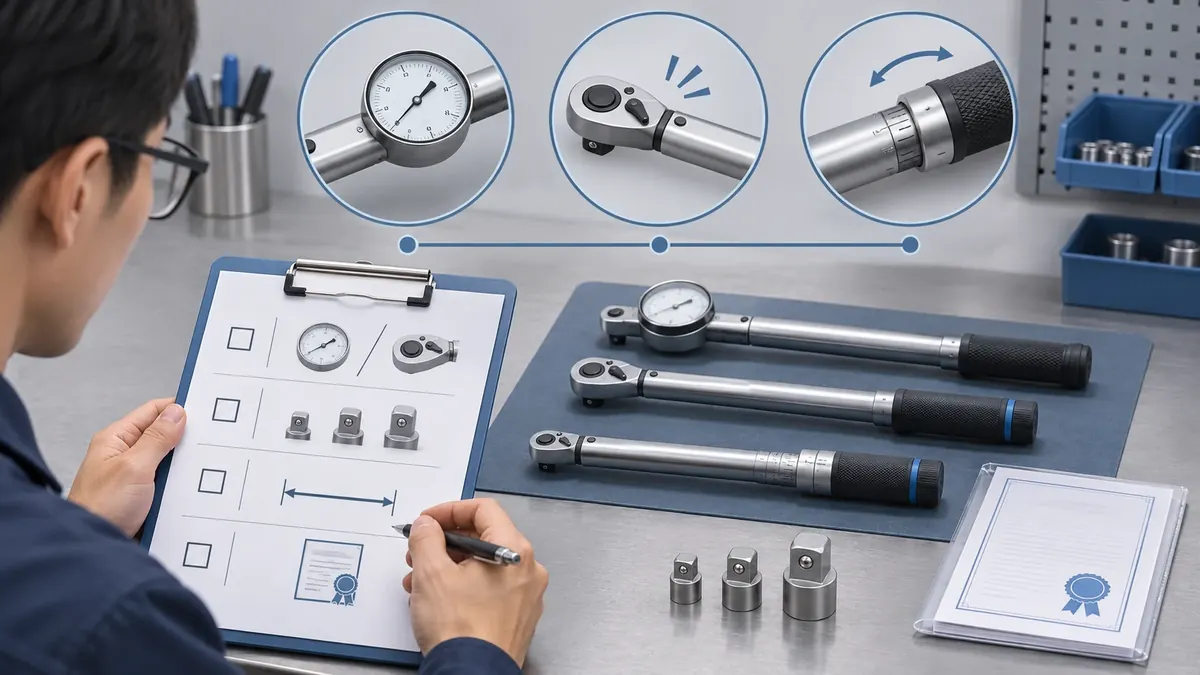
Before accepting a substitute, compare details that affect use: model, drive size, working range, units, direction, adjustment lock or configuration, visibility, signal type, access to the joint, supplied accessories, and current documentation. If a requested data export, memory feature, interchangeable head, or fixed setting is important, put it in the inquiry and verify it in writing. A similar “digital” label or nominal range is not evidence that the substitute supports the same workflow.
This overlap also matters for product listings. A catalog may group products by application, drive, mechanism, display, or setpoint method. Different sellers may use different headings for the same device. Buyers can reduce ambiguity by mapping every candidate to the three axes and keeping the maker’s model identifier attached. Avoid turning catalog categories into an exhaustive taxonomy; the researched sources show multiple families and hybrids, not a single official count of all torque-wrench types.
How to Specify a Tool for a Hardware Assembly Review
Begin with the assembly requirement approved by the product or process owner. The wrench type cannot determine the correct torque value for an unknown screw joint. Material, fastener, lubrication, finish, thread condition, insert, bracket geometry, assembly sequence, and other inputs may matter, and those conditions are not established by the wrench name. If the required value has not been set and supported, do not invent one to complete a comparison table.
Then state what the operator must observe and how the tool is expected to respond. If the work instruction requires a visible reading, specify the desired indication and units. If it requires an alert, state the acceptable signal type only after checking the model documentation. If the work depends on a preset, describe who sets or verifies it and how changes are controlled. If a digital record is requested, specify what information must be captured and confirm that the exact model supports it. Keep calibration status, measurement uncertainty, or traceability requirements as separate documentation questions rather than assuming they come with an electronic display.
Check physical interface and access. A tool may have the right nominal drive but still be difficult to position around a product, bracket, or nearby panel. Confirm socket or head compatibility, swing clearance, direction, access orientation, and the maker’s permitted configuration. Use the separate socket-and-wrench interface guidance for the tool-interface distinction. Do not infer the complete wrench’s torque control from socket compatibility.
The supply request can list: manufacturer and exact model; indication type; trigger or release behavior; preset or adjustment method; units and direction; usable range; drive or head interface; manual or data sheet; included accessories; and any record or storage function. Mark which items are mandatory and which are preferences. When a quotation substitutes a model, request a side-by-side feature confirmation rather than accepting a similar photograph. Keep the approval linked to the assembly drawing or work instruction so later purchasing does not silently alter the method.
For an OEM discussion, the useful commercial path is the hardware drawing or physical sample and the proposed fastening method. Koitor can discuss bathroom and home-storage hardware configuration and OEM communication within its approved scope, but no claim here says Koitor manufactures wrenches, runs a torque calibration laboratory, or validates a customer’s assembly torque. A tool category article helps organize questions; it is not a joint-design approval or a test record.
What the Type Alone Cannot Prove
A wrench label does not prove calibrated accuracy, a particular uncertainty, a valid certificate, a safe torque for a specific assembly, or a successful joint outcome. Those conclusions require the appropriate method and records. The reviewed manufacturer sources explain types and selected model behavior; they do not provide a universal accuracy class or a torque specification for bathroom hardware. If a supplier provides a certificate or test sheet, check the named tool, date, range, method, and acceptance criteria with the responsible quality function. Where the assembly uses a prevailing-torque nut, review the separate prevailing-torque nut guide for that fastener feature; it does not determine the wrench family. Do not assume that a document title proves the required scope.
A click or pivot does not prove that the operator stopped at the correct moment. A readout does not prove that its units, direction, setting, or display mode were understood. A saved result does not by itself show that the fastener, joint, coating, or assembly is acceptable. These are different stages: the tool provides a documented signal or reading; the operator follows the procedure; the responsible party decides whether the evidence satisfies the approved requirement.
The tool must also be used as its manufacturer directs. Do not borrow reset, bending, zeroing, repair, or calibration instructions from one brand and apply them to another type. Park Tool’s care guidance is about its tools; Mountz’s TBIH FAQ is about a named break-over model; Stahlwille’s hybrid example identifies a particular model. None establishes a universal repair recipe. Where the instrument is damaged, overdue, uncertain, or outside its documented range, use the organization’s approved calibration or replacement process.
For assemblies with risk or performance requirements, tool choice should be reviewed with the engineer or process owner who defines the joint and acceptance evidence. This guide does not provide a torque-tension calculation, load rating, anti-loosening guarantee, or universal fastener setting. Lubrication and surface condition can affect torque-tension relationships; see the separate the separate bolt torque, tension, and friction topic for that topic. A the separate torque-screwdriver calibration and assembly topic covers its separate evidence question. Link to those owners when the reader needs them instead of stretching this classification article into calibration or joint engineering.
A useful purchase record therefore preserves boundaries. Identify the exact tool and its documented functions. Identify the assembly requirement and who approved it. Note what evidence is required before production use and who reviews it. If the proposed process changes, update the controlled record rather than relying on a remembered click, display, or preset label. This keeps a type comparison useful while preventing it from being mistaken for qualification.
Frequently Asked Questions About Torque Wrench Types
What are the main torque wrench types?
Commonly discussed families include beam, dial, click, break-over, cam-over or slipper, and electronic or digital tools. The list organizes common mechanisms and indications; it is not a universal count. Some products combine characteristics, so compare what the named model indicates, how it responds, and how its setting is controlled.
Is a digital torque wrench always a click wrench?
No. Digital describes electronic indication or features, while click describes a particular mechanical signal or trigger behavior. Some documented models combine electronic measurement and a mechanical click, but that feature is model-specific. Verify the maker’s exact specification.
Does a click wrench stop applying torque automatically?
Do not assume so. A click is a signal that requires the operator to follow the model instructions. Continued movement may continue loading the joint. Only describe automatic limitation if the exact manufacturer documentation supports that behavior.
What is the difference between preset and adjustable?
Those words concern setting control. Preset generally means a value is established for the tool or workflow; adjustable means the user can change a setting under documented conditions. Neither term alone identifies the indication or trigger mechanism.
Is a break-over wrench the same as a cam-over wrench?
The terms refer to different model-specific mechanisms. A break-over design pivots to signal a condition; a cam-over or slipper design may release or slip. Read the named manual for behavior, application, direction, and required operator response rather than relying on a shared sound.
Which torque wrench type should a buyer choose?
Choose only after the responsible process owner defines the joint requirement, usable range, units, direction, access, interface, and evidence needs. Then compare exact model documentation against those requirements. This article does not select a torque value or endorse one family for every assembly.
اعمل مع شركة «كويتور» للأدوات
Discuss Your Next Hardware Project
Share your hardware drawing or sample, the proposed fastening method, the approval requirement, and expected order quantity. Koitor can discuss product configuration, sample development, and practical OEM preparation within its bathroom and home-storage hardware scope.
OEM / العلامة التجارية الخاصة
حوّل دليل التوريد هذا إلى موجز منتج
يرجى إطلاعنا على المنتج المستهدف، والحجم، والتشطيب، وكمية الطلب، ومتطلبات التغليف. وسيتلقى فريقك تقييمًا عمليًّا لإمكانية التصنيع قبل تقديم عرض الأسعار.
 English
 Español
 Português
 Français
 Deutsch
 العربية